Guide

Past updates

v2.9.10.0

Launch of Sales Team Free Support Feature and Email Sending Stabilization — v2.9.10.0 Update

This update stabilizes the process of finding buyers and preparing campaigns. Here are the key changes and improvements to your environment.

Buyer Search

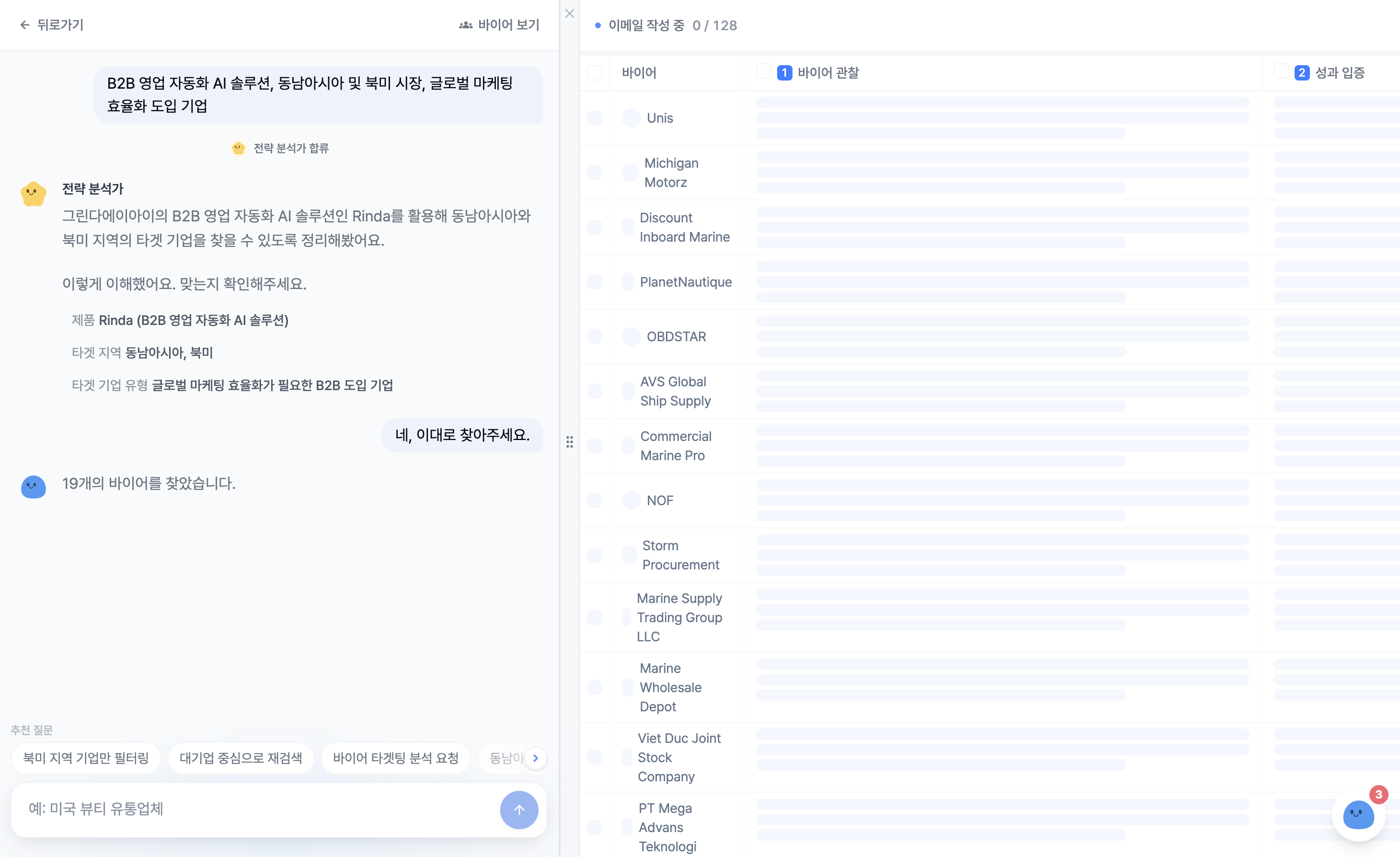
  • Sales Team Free Support: When checking overseas market exploration results, we have added a custom proposal feature where the Rinda Sales Team finds buyers directly for you. When the notification window appears, please click [Like]. We will notify you of the results via email within 1-3 business days.

  • Improved Exclusion Condition Accuracy: Exclusion conditions entered in search terms (e.g., exclude Amazon sellers) are now reflected in search results.

  • Enhanced Data Reliability: We have strengthened filtering to block websites that are not actual buyers and re-verify email validity.

  • Enhanced Score Display: We now display whether a specific brand is an exclusive/official distributor in the score details to help you evaluate buyers.

Enhanced Support for New Users

  • Customized Initial Setup: By setting your product category and buyer type (multiple selections like distributor, importer, etc.) first, we have increased the accuracy of your first search.

  • Trial User Usage Protection: If a buyer search is interrupted midway, search usage will be deducted only slightly.

  • Real-time Sending Status Monitoring: If you are using a company domain, you can check the daily sending limit increase trend and domain warming status on the [Settings] screen.

Campaign Creation and Sending

  • Buyers excluded in step 1 of the campaign will not be included even after refreshing, and emails will not be sent to them.

  • Links, signatures, and images included in emails are now preserved as is.

  • Emails scheduled for sending can be edited after delaying them by 10 minutes, 30 minutes, or 1 hour.

Bonus Update!

  • You can now view the user guide in Chinese and Thai.

  • A [Domain Management] menu has been added to connect an English company introduction page to your purchased sending domain.

  • We have improved data loading speeds and applied icons to show processing status.

  • The new Gmail account integration service is being discontinued. However, there are no changes to the use of existing accounts.

If you have any inconveniences or need any features while using the service, please feel free to leave your feedback.

We will continue to consistently improve the user environment to make connecting with global buyers easier.
v2.9.9.0

Easier Campaign Creation and Large File Attachments

We have focused on resolving the various inconveniences you may have experienced while searching for overseas buyers and sending cold emails.

We have revamped the interface to allow you to design campaigns while verifying recipients more accurately, and we have established a foundation that allows you to smoothly send large catalogs or proposals.

Complete Revamp of the Campaign Creation Screen

We have organized the complex campaign creation process into steps to reduce email sending errors and help you clearly understand the workflow.

  • In Step 1, you can set the campaign name, target buyer group, and sender email address at a glance using a card-based layout.

  • When you select a buyer group, it immediately provides a sentence explaining the exclusion reasons and the actual number of buyers who will receive the email.

  • At the top of the Step 2 content creation screen, you can check and edit the sender and recipient information at any time.

  • The writing status (Not Started, In Progress, Completed) is displayed for each email, and you can easily load templates and AI drafts from the 'Import Draft' section.

Support for Large File Attachments Over 20MB

We have improved the limitation that made it difficult to send heavy company introductions or product catalogs due to size restrictions.

  • You can freely attach large files exceeding 20MB (up to 2GB per file) on the email composition and reply screens.

  • Real-time progress is displayed during upload, and files are safely delivered to the recipient via a download link with no expiration date.

Added Sharing Tool to Check PDF Viewing Status

A new feature has been added that allows you to track the response to proposals or materials sent to buyers with numerical data.

  • After uploading a PDF document, you can create and send a dedicated link for each recipient.

  • You can track in detail whether the buyer has opened the document and which page they read up to.

Did you experience any inconvenience while using Rinda?

Please report it to us right now.

Bonus Updates!

  • A feature has been added to the Buyer Finder to search for similar companies by entering the name of an existing client.

  • A dedicated sending domain application feature has been added for workspaces on the Pro plan or higher, making it easy to handle everything from domain registration to setup.

  • The image size in email signatures can now be manually adjusted up to 300px.

  • Even if a campaign has started, you can now delete emails in the next steps that have not yet been sent.

  • You can now leave 'Like' or 'Dislike' feedback on AI answers in Buyer Finder and Help.

  • You can now open real-time meeting interpretation subtitles in a separate, larger window for easier viewing.

  • We fixed an issue where the actual number of recipients did not match the number of buyers displayed on the screen.

  • If a buyer's contact name is missing, the email greeting will now naturally substitute the company name instead of leaving a blank space.

  • Improved to allow separate settings for English signatures.

We will continue to refine the user experience so that connecting with buyers in the global business field becomes easier and more accurate.

If you have any thoughts or need any features while using the service, please feel free to leave your feedback.

v2.9.7.0

I wanted the conversation to remain even after the meeting ended — v2.9.7.0 Update

We didn't have a regular update last week, but that was because we wanted to listen to your stories a bit more.
In particular, throughout August, we participated in several trade fairs in person and were able to hear the voices of CEOs regarding our service.

This update is a direct result of the feedback we heard on-site.
For those who recorded meetings with the app at the August trade fairs, those who inquired because campaign sending was blocked, and those who reported anomalies in plan usage.
We traced each and every one of those issues down to the code level and fixed them.

The conversation remains even after the meeting ends — In-app 「Conversation Content」 tab

Previously, the interpreted conversation you saw as subtitles during a meeting only left a summary, and the original text effectively disappeared once the meeting ended.
Now, meeting details are divided into two tabs: [Summary | Conversation Content].

  • In the Conversation Content tab, you can re-read the entire interpreted conversation like a chat. Speech bubbles are separated by speaker, and both the original text and translation are visible.

  • Meetings recorded without interpretation are also separated by speaker. What used to appear as a single block of text now becomes a conversation.

  • Tap a sentence to play from that point. You can find the desired spot using playback speed (1.0 → 1.2 → 1.5 → 2.0) and the seek bar, and the sentence currently playing will follow to the center of the screen.

Also, you can now start recording without turning on your screen.
A recording tile has been added to your phone's quick settings.
Instead of taking out your phone, unlocking it, and opening the app in front of the other person, you can start and stop with a single tap of the tile.
Recording will not be interrupted even if you switch to other apps and come back.

We also polished the interpretation. We fixed issues where Korean consultations weren't being translated and were sent as-is, and where the original language was sent to the other party's screen when two languages were mixed in one sentence. We also added frequently misused trade terms like 「Unit Price」 and 「Incoterms」 to the default glossary. You can now select your language directly before starting interpretation.

When a campaign is blocked, we will tell you exactly what the problem is

There were users who clicked 「Start Sending」, only to see an English error message and lose their entire 6-step email sequence.

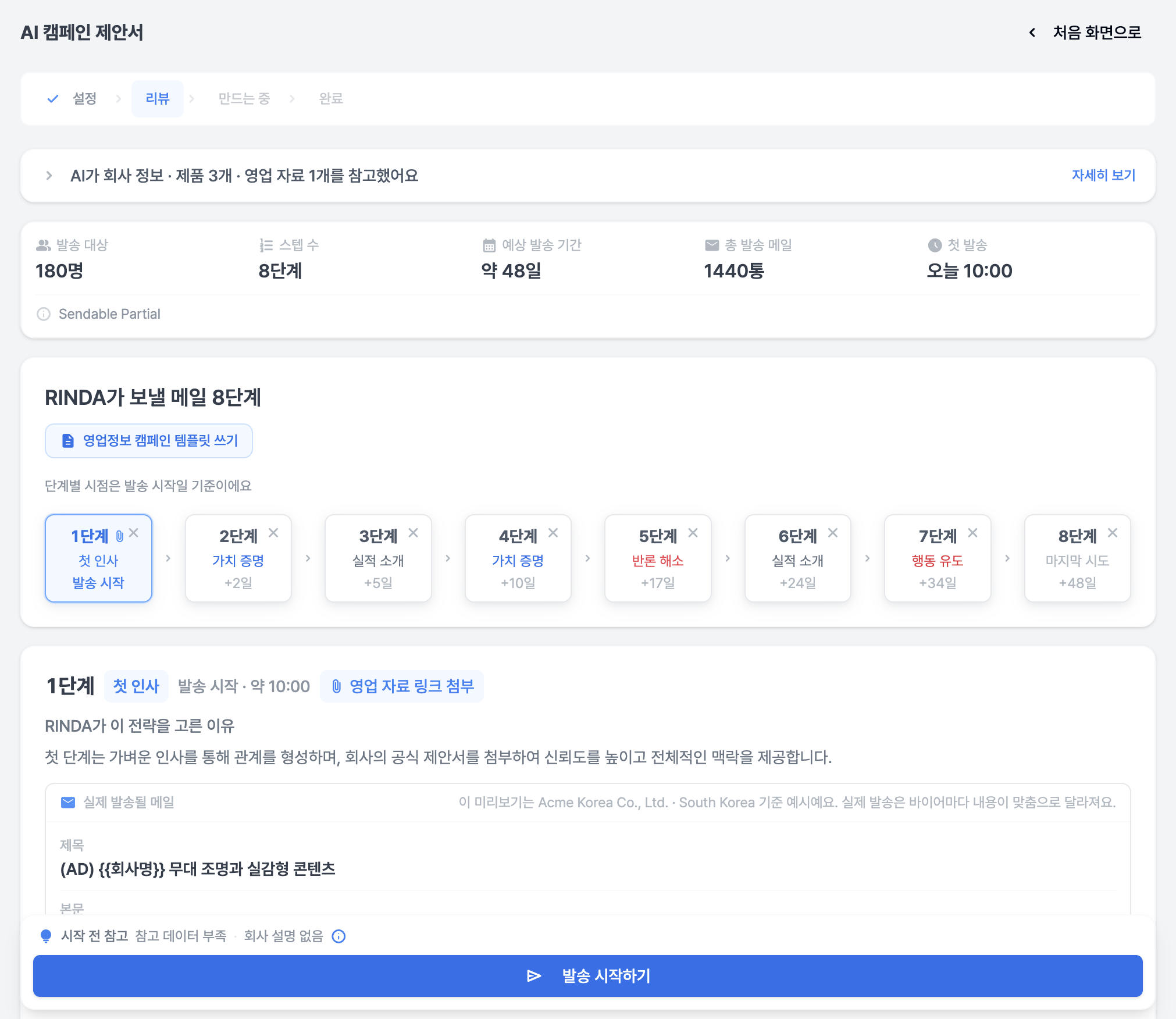
  • The sender address is now visible on the review screen, and you can change it to a different address right there. If the address is disconnected, we will let you know as soon as you enter.

  • Even if sending fails, the email you wrote remains intact, and we will tell you the cause in plain language, along with the next steps to take.

  • A record is kept of whether the test email actually arrived. Since a new sender address is often seen as a first-time sender by the recipient, it frequently goes to the spam folder, so we provide guidance on that as well.

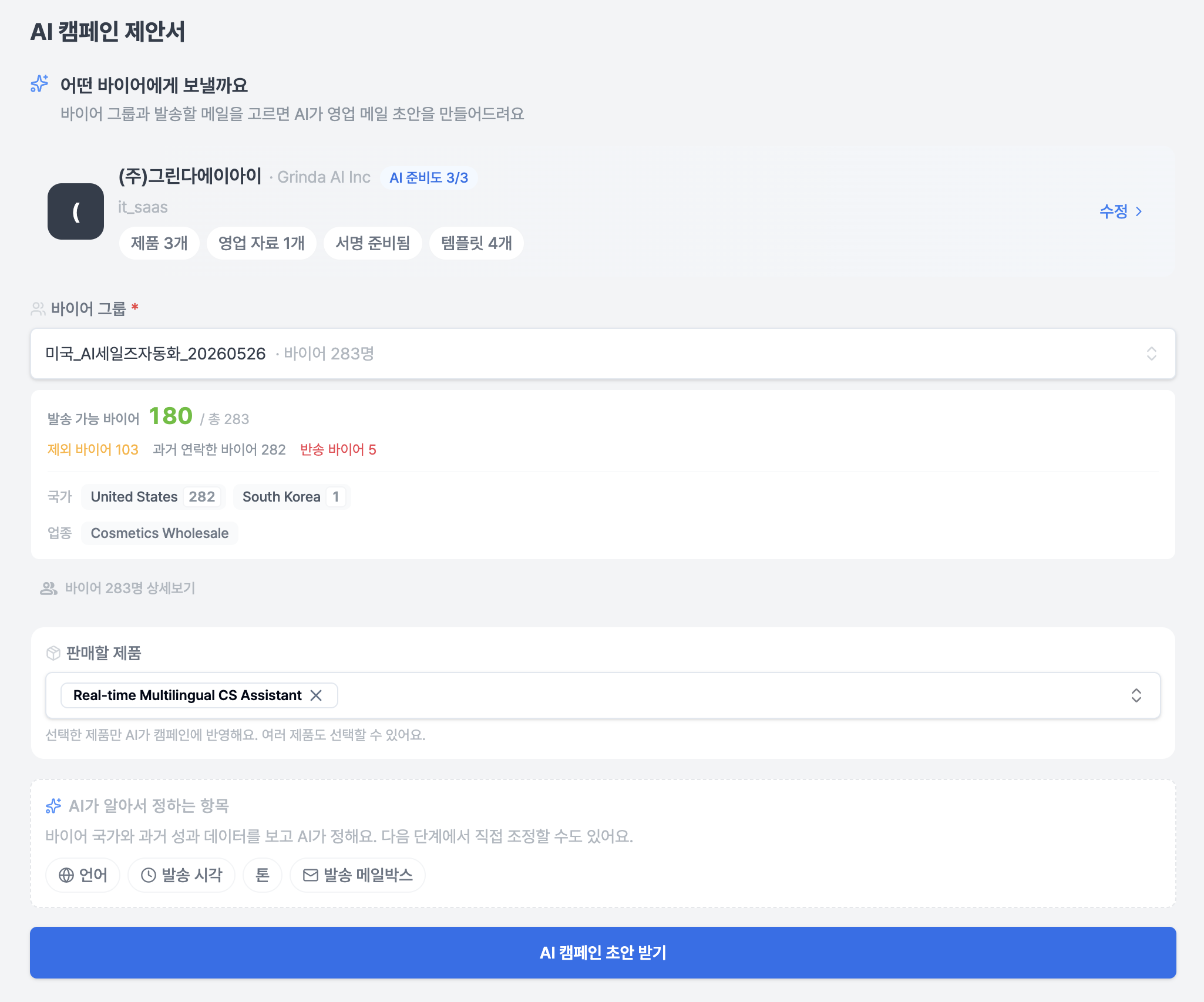
Also, the campaign now pulls the product being sold from the buyer search.
For agencies and trading workspaces that handle products from multiple companies, we fixed the issue where the campaign body would talk about other products listed in the company introduction.
Now, the product from the buyer search used to create that group is the standard, and the body text you edit yourself will remain exactly as is in any case.

In the 「Leave it to Rinda」 body text, the opening and closing greetings have returned, and Korean names/company names will no longer be mixed into the English body text.

One month from the payment date, exactly as much as you paid for

Usage was reset on the 1st of every month, but since most payment dates were not the 1st, the amount used during the trial period before payment was being deducted from the paid limit.
Now, usage tracking is aligned to one month from the payment date, and it resets the moment you make a payment.

  • We fixed the issue where the sidebar was empty after the trial ended, leaving no entry point for payment.

  • The sidebar usage widget can now be collapsed and expanded. This solves the issue where the profile and upgrade buttons were pushed off the screen on laptops. The remaining period is visible even when collapsed.

  • We fixed the issue where buyers uploaded via Excel were consuming the AI search limit.

Other changes

  • The text has become bolder. Following feedback that users were enduring faint text by zooming in to 200% in the browser, we have increased the contrast standard for auxiliary text across the entire screen.

  • In [Buyer Management], you can now 「Move」 buyers to a different group. You can choose copy/move in the copy window. The country filter has also returned, and 「Japan」, 「일본」, and 「JP」 are now grouped as one.

  • If you end a follow-up in the [Email Inbox], emails will no longer be sent to that company. The reason and memo selected when ending the follow-up will remain in the block list. It will be unblocked if you reopen it.

  • The country field for export documents has been opened to 259 countries, and you can search and select them.

  • The Chinese interface now uses Chinese fonts. Sign-up verification emails are also sent in 6 languages.

  • We will notify you immediately when a representative is assigned to your inquiry chatbot, and leave a note when the representative leaves. Answers will be provided in the language you asked in, not the screen setting language.

  • We removed the example 「Unread Reply」 card that was on the first screen immediately after sign-up. It was indicating there were replies when there were actually none.

  • The feature where the interpretation bot speaks aloud has been removed. Subtitles and records are the results of interpretation, and audio made conversations twice as long, so it was rarely used in the field.

  • (Reflected earlier last week) The sender address/failure guidance on the campaign review screen, group moving/country filter, end → block linkage, usage tracking window, Hungarian currency display, chatbot representative notification, and Thai subtitle font were reflected before the regular release.

We are currently considering whether we should keep our update cycle from being too tight.

We will continue to stabilize the service so that it does not feel like a "test version" to you, our valued users.

v2.9.6.0

Tool Stabilization, Simplified Settings — v2.9.6.0 Update

In our last update, we opened 6 additional tools in the [Export Toolset].
This time, instead of opening new tools, we've cleaned up the screens that many of you mentioned were "confusing because there are so many settings and I don't know what's turned on."

However, after cleaning them up, we realized that you might not have even known those screens existed in the first place.
So, rather than focusing on what has changed, we'd like to start by explaining where these screens are and what they do.

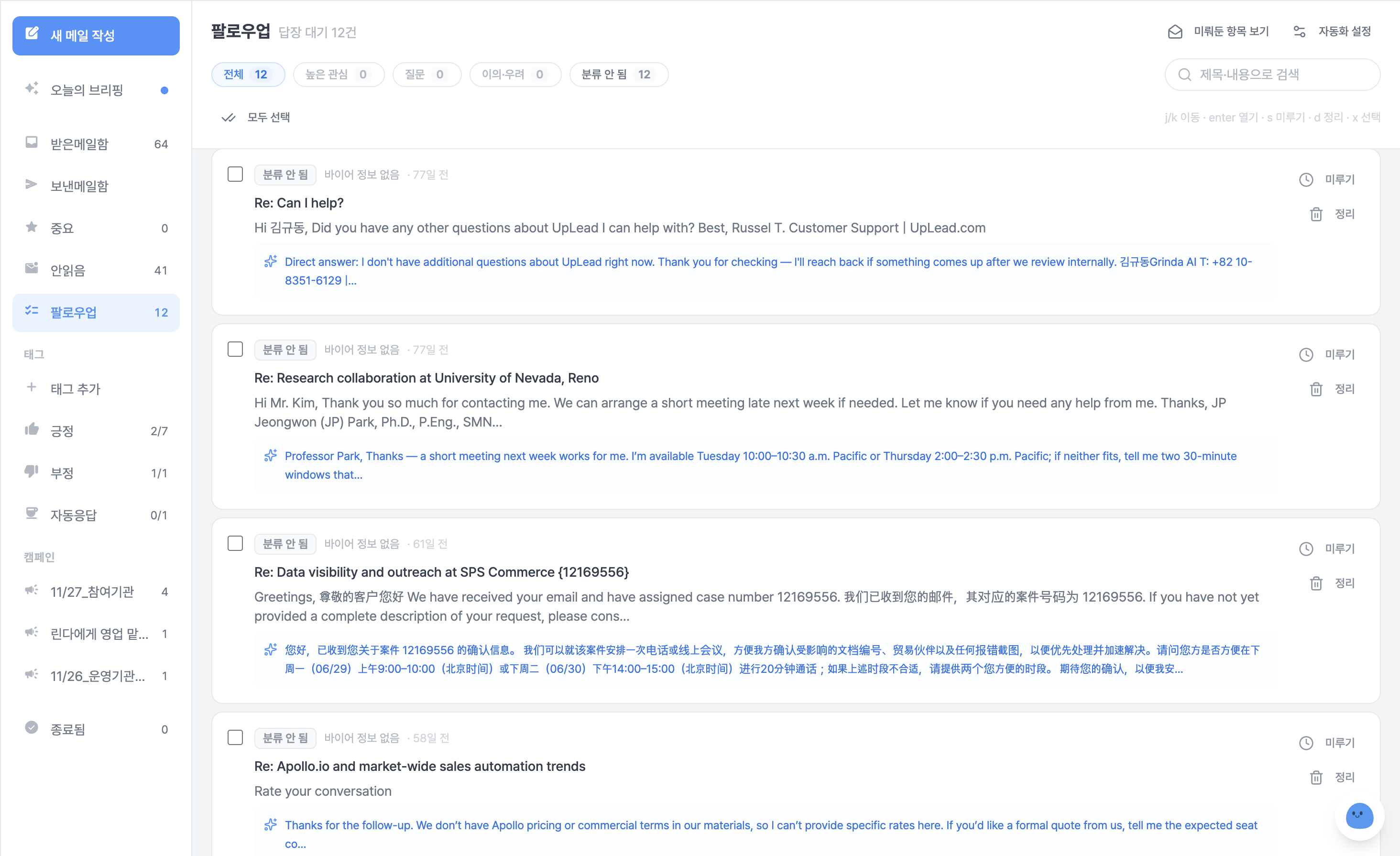
Where AI prepares drafts when a reply arrives — 「Follow-up」 in [Mail Inbox]

If you haven't seen this screen yet, we'd like to introduce this feature before the update itself.
Inside the left menu [Mail Inbox], there is a section called 「Follow-up」.

After you send a campaign, when a buyer replies, Rinda reads the reply and prepares a draft reply in advance.
You just need to review the draft, make any necessary edits, and send it.
The email is only sent when you personally click the send button. We never send emails on your behalf.

Replies are categorized and stacked — Meeting Request, Positive Interest, Question, Objection/Concern, Out of Office, No Interest.
If you filter by 「High Interest」, you can see what needs to be answered first.
You can move items that are difficult to answer right now to 「Snooze」, or clear out ones you don't intend to answer with 「Archive」.

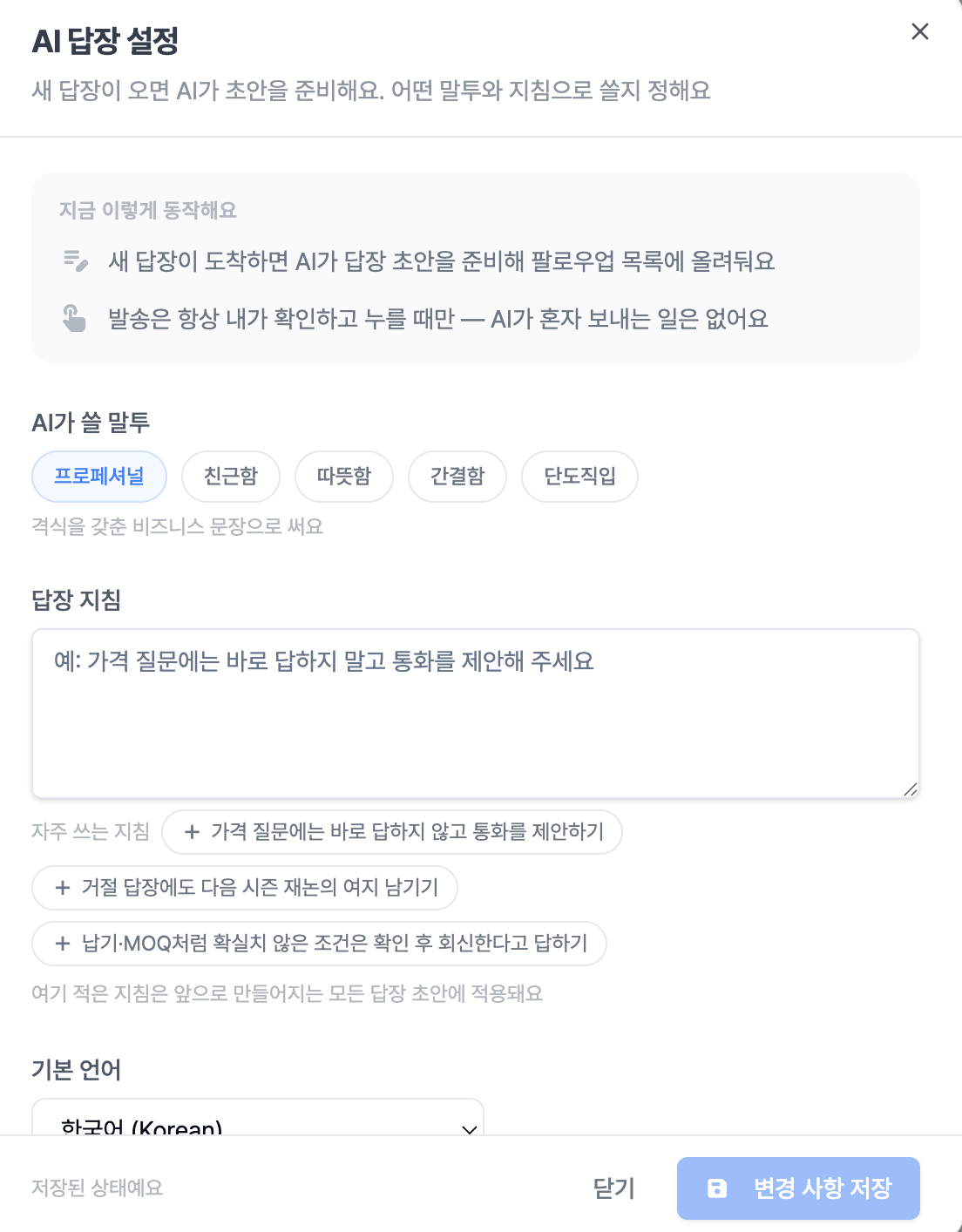
You can configure several settings in that 「Follow-up」 section

  • Your preferred tone and reply guidelines are reflected in the draft. If you write down instructions like "Please suggest a call when there is a price inquiry," they will be reflected accordingly. If you're not sure how to write them, you can click on the three examples provided.

  • We let you know what is currently active at the top of the screen. When a new reply arrives, the AI prepares a draft, and sending only happens when you personally click the button.

Settings can be checked in 「AI Reply Settings」 on the 「Follow-up」 screen. If you haven't changed the settings before, the drafts created will be the same as before.

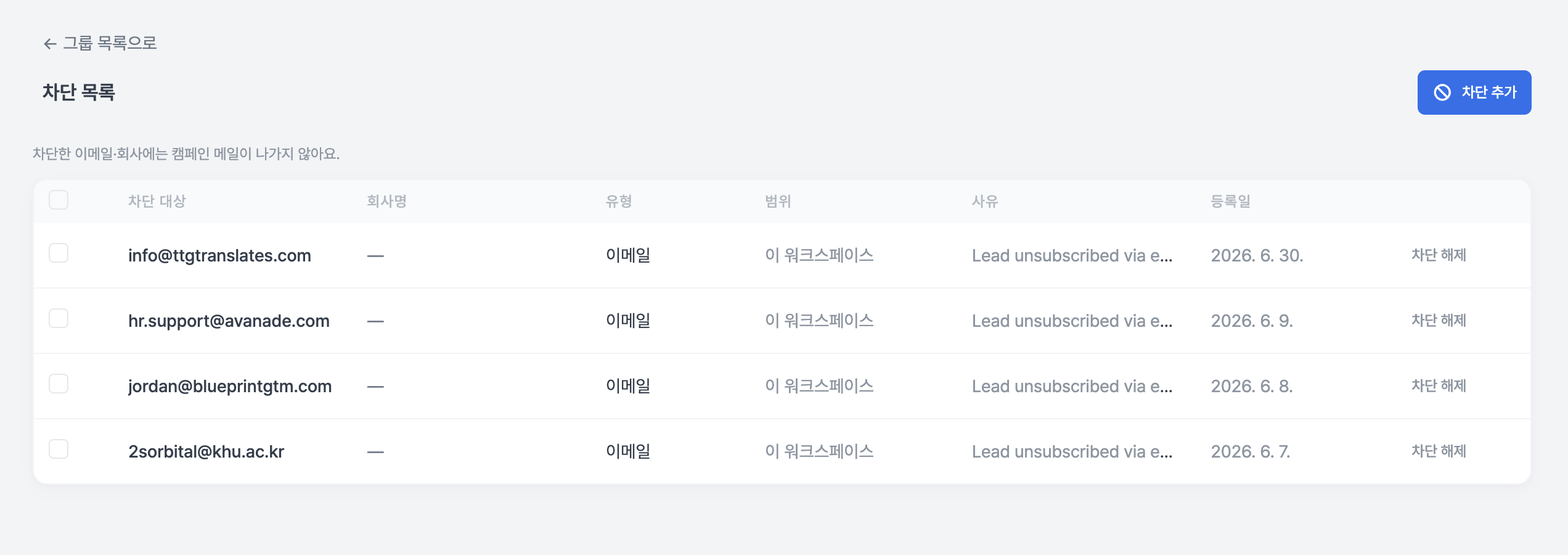
「Block List」 for places where you shouldn't send emails

If you go to [Buyer Management] in the left menu, you will see a 「Block List」 above the group list.
Campaign emails will not be sent to the email addresses and companies you have added here.

  • You can block a single email address, or you can block an entire company. For an entire company, just enter the address after the @, and all addresses for that company will be blocked.

  • When blocking, you can leave the company name and reason together. This is because if only the address remains, you won't know who it was a few months later. You can select a reason from the list, or if it's not there, you can write it yourself under 「Other」.

  • Even if there are many items, all of them are visible, and you can find them through search and pagination.

  • Buyers who were excluded from sending due to being blocked are also shown on the screen.

Addresses where the buyer has directly expressed an opt-out are displayed as 「All Client Companies」. You cannot unblock these addresses from your side; they are only unblocked if the recipient informs you that they wish to receive emails again.

We have consolidated the screens into one place this time. You can filter opted-out/bounced buyers by status in the [Buyer Management] list.

Other Changes

  • We have refined the banner and background on the first screen of the [Export Toolset].

  • Team members who have been invited can now work together. We fixed the issue where the introduction/English catalog screen wouldn't open on team member accounts, and where campaign creation and Copilot were blocked.

  • You can check how prepared your company is for export with a score. You can go to 「Get Export Readiness Diagnosis」 on the first screen of the [Export Toolset]. It takes 8 questions and about 2 minutes to complete, and we don't just give you a score; we show you what has been filled in and what remains by category. You can also share the results via a link.

  • You can download the app for registering business cards received in the field directly from the [Export Toolset]. If you go to the 「Business Card Photo Registration」 card, the installation and connection methods are all on one screen. If you are viewing on a computer, just point your phone at the QR code, and you can connect using your email and a 6-digit verification code. (Currently only supports Android.)

  • When you click 「English Product Catalog」 in the [Export Toolset], the list of introductions you have created will now open first. You can create multiple, name them, or delete them. When creating a new one, we show you four cover candidates first, so you can choose the one you like.

  • You can retrieve and reuse export documents. The documents you created remain, so you can duplicate or reissue them, and you can also see the issuance history.

  • We provide guidance on where and how to obtain a Certificate of Origin. Since this is a document we cannot create for you, we have summarized the issuing authorities and procedures instead.

  • The HS Code search and Tariff/FTA calculation screens have been changed to be more intuitive. We have cleaned up the parts where you felt stuck in front of a blank screen not knowing what to enter. We also fixed the issue where the tariff basis link always only showed 「When exporting from Korea」.

  • We have reorganized the first screen and entry cards of the English Company Introduction page.

  • You can resume sending after payment if it was stopped due to a payment interruption. You don't need to create it from scratch.

  • When sending is delayed, we inform you of the reason by category. The screen will tell you if it's due to a plan limit or the daily limit of the email account itself.

  • We fixed the text that incorrectly guided the reason why an email was not sent. We corrected the issue where cases stopped due to address verification were guided as "Could not find sending time," and corrected phrasing that stated verification results as confirmed facts.

  • We no longer send to addresses that the recipient has permanently rejected.

  • Follow-up drafts are now in the language the buyer uses. We fixed the issue where they were appearing in Korean.

  • Buyer search finds more results that were previously missed. We fixed the issue where search history was only partially saved and adjusted the criteria for judging the role of the person in charge.

  • We fixed the issue where 「Proceed after information collection」 was not collecting any emails.

  • We fixed the issue where emails from unrelated companies were attached to buyers without a website.

  • When choosing a market, we now show 「whether replies come from that country」.

  • The number of places you can send to is displayed in the first step of creating a campaign.

  • We organized the gallery cards in the buyer list into 「Create Group」. It did the same thing as the button above.

  • The appearance of the emails you send is now the same as the composition screen. We fixed the issue where the spacing of paragraphs, lists, and quotes would collapse in the recipient's inbox. (Reflected earlier last week.)

  • When uploading a buyer list, the preview is now the same as the actual result. We restored missing lines and you can choose whether to include buyers to be merged into a group. (Reflected earlier last week.)

  • Meeting titles have been shortened for at-a-glance viewing, and titles are now attached to meetings created from business cards.

  • The first screen for new users now shows actual values instead of example numbers. Guidance on what to do first is also provided again.

  • Interpretation meeting records no longer disappear in the middle. Even interpretations that were disconnected and reconnected now include the entire preceding part in the summary. (Reflected earlier last week.)

  • We consolidated the inquiry pop-ups into one.

  • We unified the plan name to 「Partners」.

This time, rather than a major update, we focused on the stabilization of export tools and service stability.
It's like a short vacation(?) period has been given to the Rinda service, which has been running hard so far.

Of course, our Rinda service will not stop and will continue to improve day by day.
If you encounter any issues while using it, please let us know anytime via 「Request New Tool」 at the bottom of the [Export Toolset] or by clicking the inquiry button at the bottom right of the screen.

v2.9.5.0

6 Export Tools Now Open — v2.9.5.0 Update

When we launched the [Export Tool Suite] in our last update, we mentioned that we would let you know as soon as the tools still in preparation were ready.

We have now opened 6 of those tools for you to use.

Documents, Customs, Certification — The "Must-Do" Tasks of Export Operations Have Become Tools

Create Export Documents — You no longer need to recreate invoices and packing lists in Excel separately. Enter the data once, and the same figures will automatically populate both documents. Select currency, units, and Incoterms from the lists, or enter them manually as "Other" if they aren't listed. Your payment account, country of origin, and signatory details are also included in the documents. We've reduced the input fields to the 33 most essential ones and refined them to ensure you don't miss fields that frequently cause customs clearance issues.

Find HS Codes — You don't need to ask a customs broker; we provide the correct HS code for your product along with the reasoning behind it.

Calculate Customs & FTA — Compare which countries are more profitable by analyzing customs duties and FTA benefits. Simply select the country on the world map.

Export Requirements by Country — We summarize the certifications required to enter each country.

The Map Answers Which Country to Target with Color

Where Competitors Are Selling — We show you where and to whom products like yours are being sold. The world map uses color-coding to distinguish between highly competitive markets and untapped ones, allowing you to choose which market to explore at a glance.

Standardize Product Photos for Buyers

Organize Product Photos — We standardize your varied product photos into a square format with a white background and consistent size. These specifications are ready for use in catalogs or brochures. You can now fix alignment issues caused by photos of different sizes and backgrounds all at once.

Major Overhaul of Export Brochures

We have restructured the brochure from the table of contents to the slides, following a brand presentation framework. We fixed the issue where product photos would disappear or the export process would fail when exporting to PDF, and the screen now updates in real-time to show you the progress while you create it.

You can edit the generated slides directly, and just like in a presentation editor, you can move and refine text and elements right on the slide.

A "English Product Catalog" card has been added to the [Export Tool Suite], allowing you to access it directly from the card without going through the brochure screen.

Fixed the Issue Where Emails Were Sent All at Once When Campaigns Were Activated

Previously, if you activated a campaign after its scheduled send time had already passed, all the queued emails would be sent out immediately.

Now, if the scheduled time has passed, it will move to the next sending date, and there is a 60-minute grace period immediately after activation.

Other Changes

  • You can receive a 50% discount on your first payment until September 14th. We have extended the event by one month.

  • The screen now tells you why an email wasn't sent. Instead of just showing "Not Sent," we have categorized the actual reasons into 6 types.

  • Campaign buyer selection has become more accurate. Buyers already in progress are excluded by default, and you can include them all at once if needed.

  • Bounce handling has been re-categorized. We resolved issues where we kept sending to addresses rejected by the recipient, as well as issues where valid addresses were discarded due to temporary errors.

  • Recovered missing results in Buyer Search. We fixed the issue where results were completely discarded due to differences in HS code notation, and the issue where the system would say "Not Found" simply because the search took too long.

  • Fixed the issue where France and the UK disappeared from the map.

  • Values are no longer lost when downloading and re-uploading buyer lists as CSV. Even if already registered buyers are mixed in, the system now fills in missing contact information without discarding those rows, and we fixed the issue where the preview would block uploads by saying "0 registered."

  • We now tell you the reason when email account connection hits a limit. Instead of just saying "Please try again," we guide you on which limit was reached and what to do next.

  • Refined the titles and sentences in the Weekly Performance Report. We changed it so it doesn't feel like a report card for a quiet week.

  • When you are curious about pricing, the chatbot now answers with the actual amount. Instead of just giving you a link, it provides the answer in your local currency.

  • Actual screen captures have been added to the User Guide so you can follow along while seeing exactly where to click. We have also prepared guides for each of the newly opened tools.

  • Clicking the readiness indicator on the sales information screen now takes you directly to the field that needs to be filled.

  • You are now guided in the language you used to sign up, and if entering your company name is blocked, the screen will tell you why.

  • Fixed the issue where the first step of creating a campaign would get stuck on "Initializing," and the issue where the list would close when selecting a group.

  • The top of the [Export Tool Suite] main screen has been organized into a single banner. You can now start from the same place regardless of your usage situation.

  • Corrected an issue where client addresses were incorrectly added to the buyer blocklist during the process of organizing unsubscribed addresses.

  • Fixed the screen that was requesting payment details while you were still in the trial period.

  • Revised the Privacy Policy. We specified the procedure for deletion requests related to Rinda Field data, which will be effective from August 20, 2026.

As the newly opened tools have just been released, there may be some awkward areas.
If you encounter any issues while using them, please let us know anytime via "Request New Tool" at the bottom of the [Export Tool Suite].

v2.9.4.0

New tools to help with exports — v2.9.4.0 update

Finding buyers, writing emails, creating introductions... export operations involve switching between many screens.
As a result, the question "So, what should I do now?" always remained.

In this update, we have created a new screen that answers that question first.

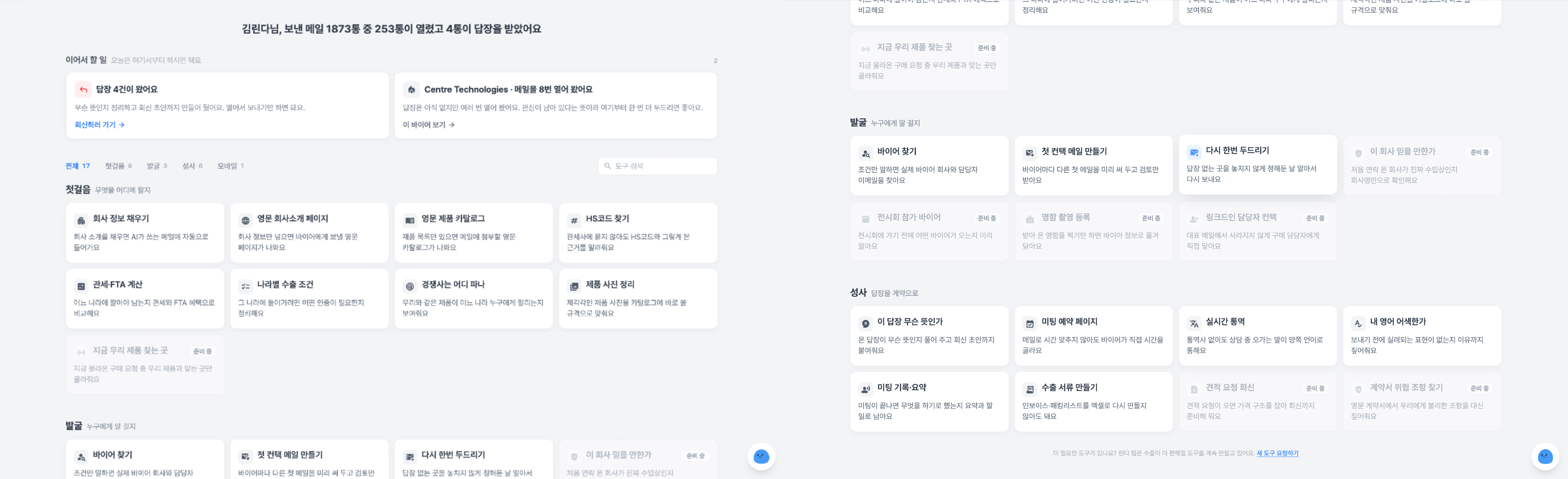
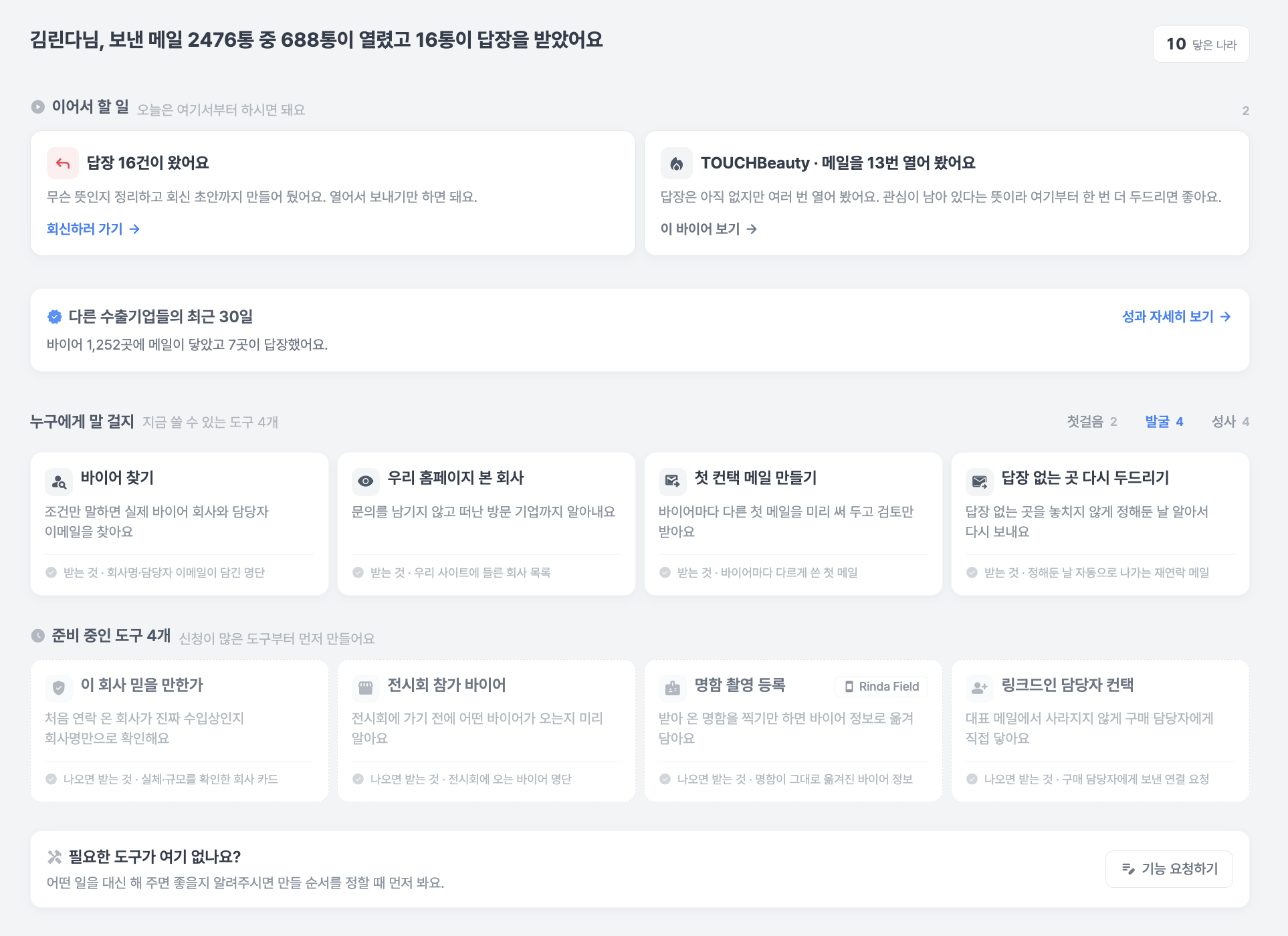
[Export Toolkit] has been added to the sidebar

We have gathered 24 tools used for export operations in one place. It is located at the top of the sidebar, and we have marked it as Beta as we are still refining it.

  • The screen tells you what to do first. Whether you haven't sent a single email yet or are waiting for replies, a "Next Steps" card tailored to your current status will appear.

  • Don't miss buyer interest signals. We highlight cards for companies that haven't replied but have opened your emails multiple times, or places where you've sent everything but are now quiet.

  • You can preview what each tool creates. You can check what the output looks like before opening the card to make your selection.

  • For tools still in preparation, you can click "Notify me when ready," and we will let you know as soon as they are available.

When you search for "Japanese clothing buyers," you get Japanese clothing buyers

We have fundamentally fixed the issue where unrelated industries were mixed into search results in the buyer finder.

  • The search query is now divided into three axes: "Item / Country / Buyer Role" before searching.
    Previously, if role words like "wholesale" or "distribution" were mixed in, the item condition would be lost entirely, leading to results like coffee roasters, animal hospitals, or travel agencies when searching for Japanese clothing buyers.
    Now, the same search will find 427 actual clothing distributors.

  • Searching again won't fill results with companies you've already saved.
    Previously, even if more than half of the results were companies already on your list, it would finish normally as "Goal Reached."
    Now, companies you already have cannot occupy goal slots, and it automatically avoids re-running essentially the same search.

  • Which countries to view now varies by company.
    Previously, we showed the same 27 countries to everyone, but now we select country candidates by reading both the company's sales information and actual export statistics.

Other changes

  • You can now create and publish export introductions and buyer catalogs yourself. Previously, we did this for you, but now you can do it directly in the [Export Toolkit]. We create everything from the table of contents to the slides, and you can also choose to receive them as PDFs without publishing. You can add the link to the published catalog to your email signature.

  • You can now duplicate campaigns and resend them. We fixed the issue where personalized body text, sending schedules, sending accounts, and multiple buyer groups disappeared during the duplication process.

  • If you get blocked when attaching files to emails, we tell you why. We have also standardized the attachment size limit to 20MB.

  • Weekly performance reports now arrive reliably. We changed the headline from "how many you sent" to Interested Replies, Meetings, and Waiting for Replies, and we will notify you if a reply to an interested response is delayed.

  • You can see the actual performance of other export companies. A summary appears in the [Export Toolkit], and you can click the card to check details by country and industry. These are not estimates we made, but numbers counted from actual buyer reactions.

  • The sign-up process has become easier. We fixed the issue where company analysis results only appeared in Korean, so they now appear in your chosen language. Instead of memorizing and entering country codes, you can select them from a list. If company name entry is blocked, the screen will tell you the reason.

  • We have cleaned up blocked points on the payment screen. We have improved annual payment guidance, recovery after payment failure, and post-payment actions, and we have also blocked Korean error messages from leaking to users overseas.

  • The issue of emails going to spam folders has been resolved by organizing sending domains, and if bounce rates increase, we automatically pause the sending account to protect it.

  • Korean translations are now displayed alongside received replies.

  • The email inbox and dashboard have become noticeably faster. Since these are screens you open every day, you will be able to feel the difference immediately.

  • We have added labels to 144 icon-only buttons so they can be used with screen readers, and we fixed the issue where the sidebar would sometimes get stuck in English.

As the Export Toolkit is a newly created screen, there may be some awkward areas.
If you encounter any issues while using it, please let us know at any time.

For your reference, you can now send feedback directly via the "Feature Request" card at the bottom of the [Export Toolkit].

v2.9.3.0

Now, Manage Meetings Within Rinda — v2.9.3.0 Update

When you receive a reply from a buyer, the next steps have always been cumbersome.
Calculating time zones to suggest times, exchanging several more emails, manually adding confirmed schedules to your calendar...
The most important thing is the meeting itself, but it took days just to schedule it.

In this update, we've brought that process into Rinda.

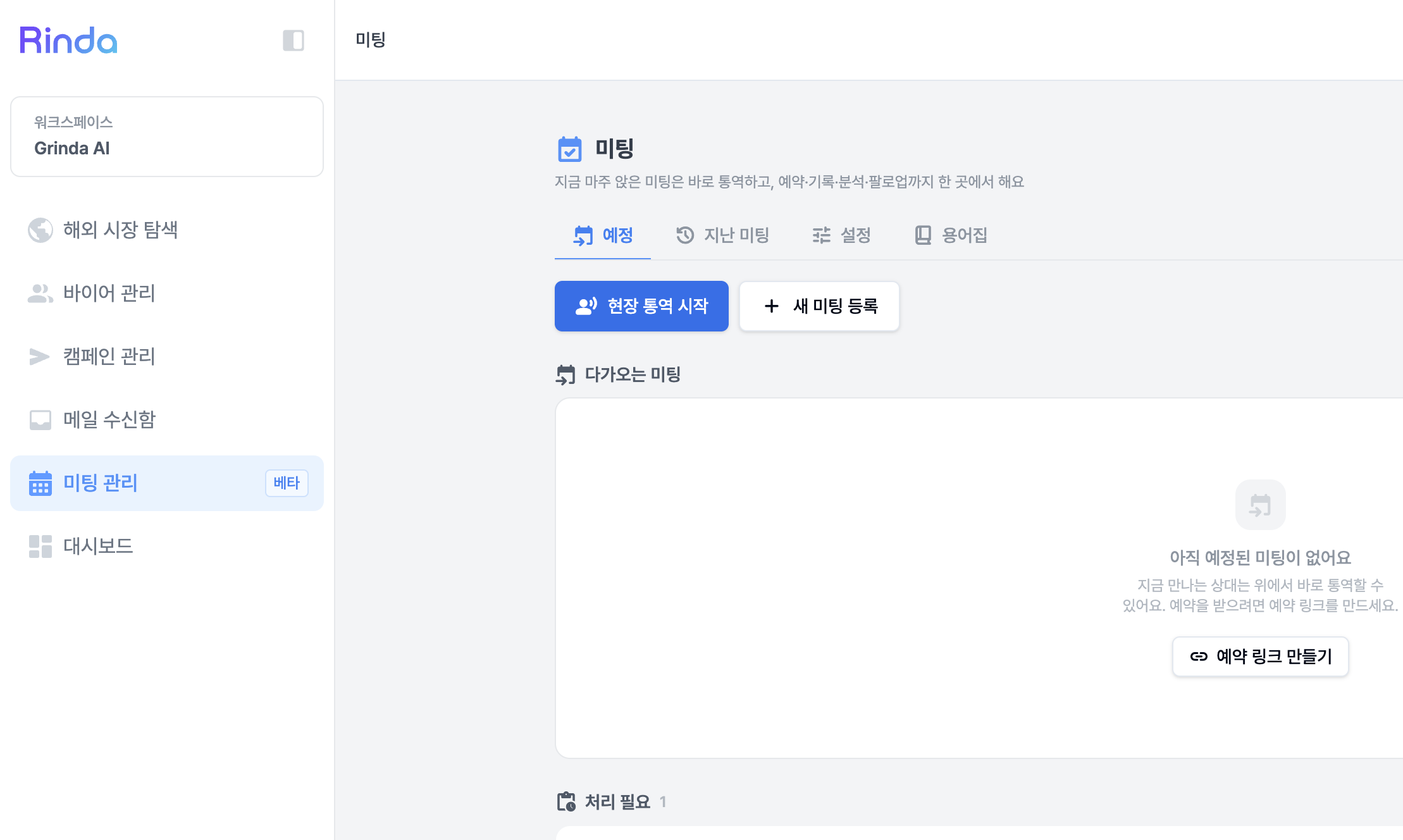
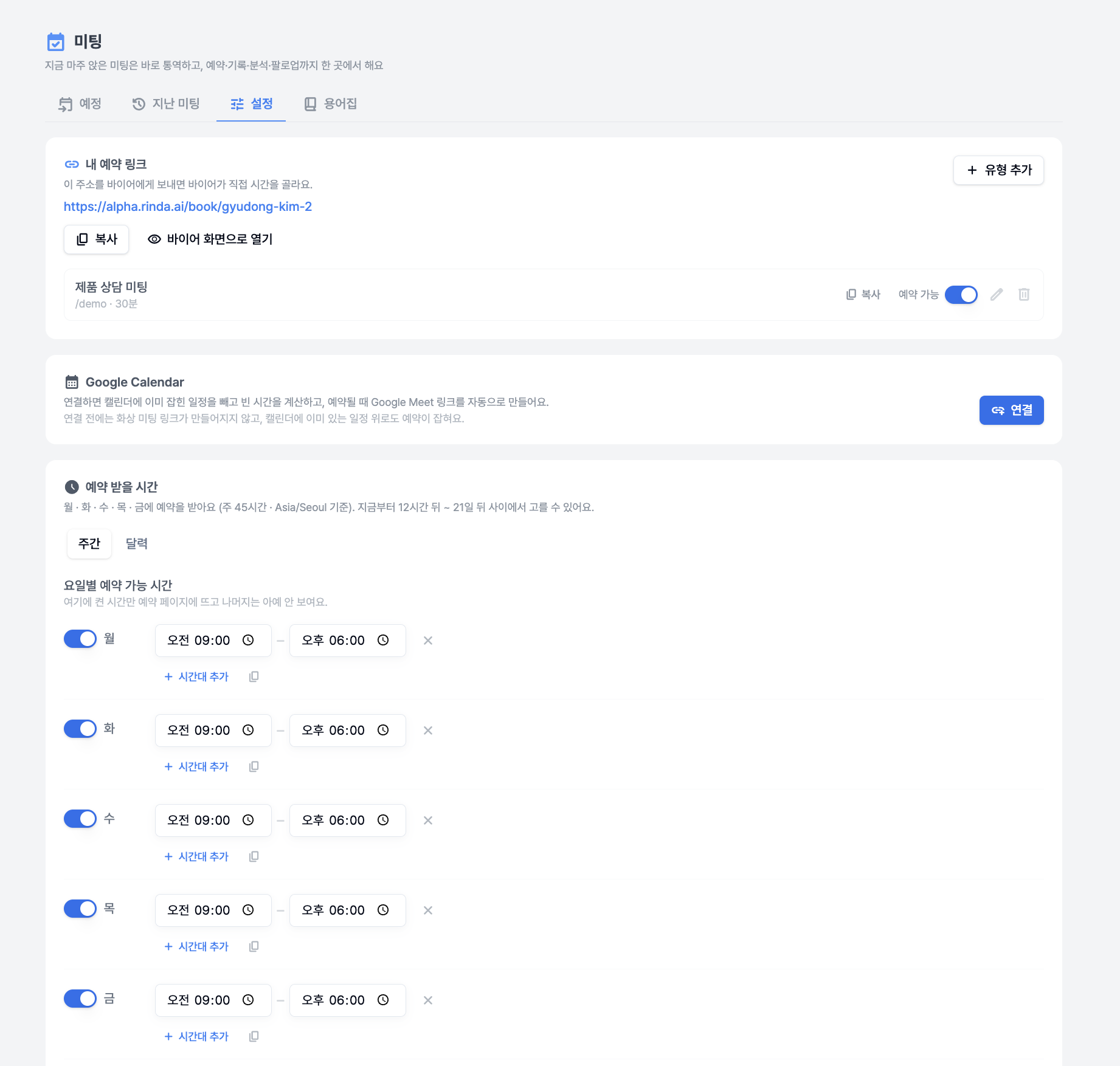
A new [Meeting Management] menu has been added to the sidebar.

It is located right below the [Inbox]. Because the next step after receiving a reply is the meeting.

  • Schedule coordination is finished with a single booking link. If you open up your available times in advance, buyers can open the link and choose a time themselves. We calculate the time difference for you, so there's no need to exchange messages like "What time is that in your time zone?"

  • You can insert the booking link directly when replying to received emails. Just select the meeting type in the AI reply draft, and the appropriate text and link for that type will be included.

  • Meeting requests that haven't been scheduled yet appear at the top of the home screen. We've made sure they don't get buried in your replies and missed.

  • You can immediately check the 'conversation that started this meeting' in the meeting details, and the AI analysis will also read and summarize the content of the exchanged emails.

  • When you first enter, a guide screen will appear to show you what to set up first. We have also redesigned the settings screen to fit the export workflow.

Even at trade shows, including interpretation

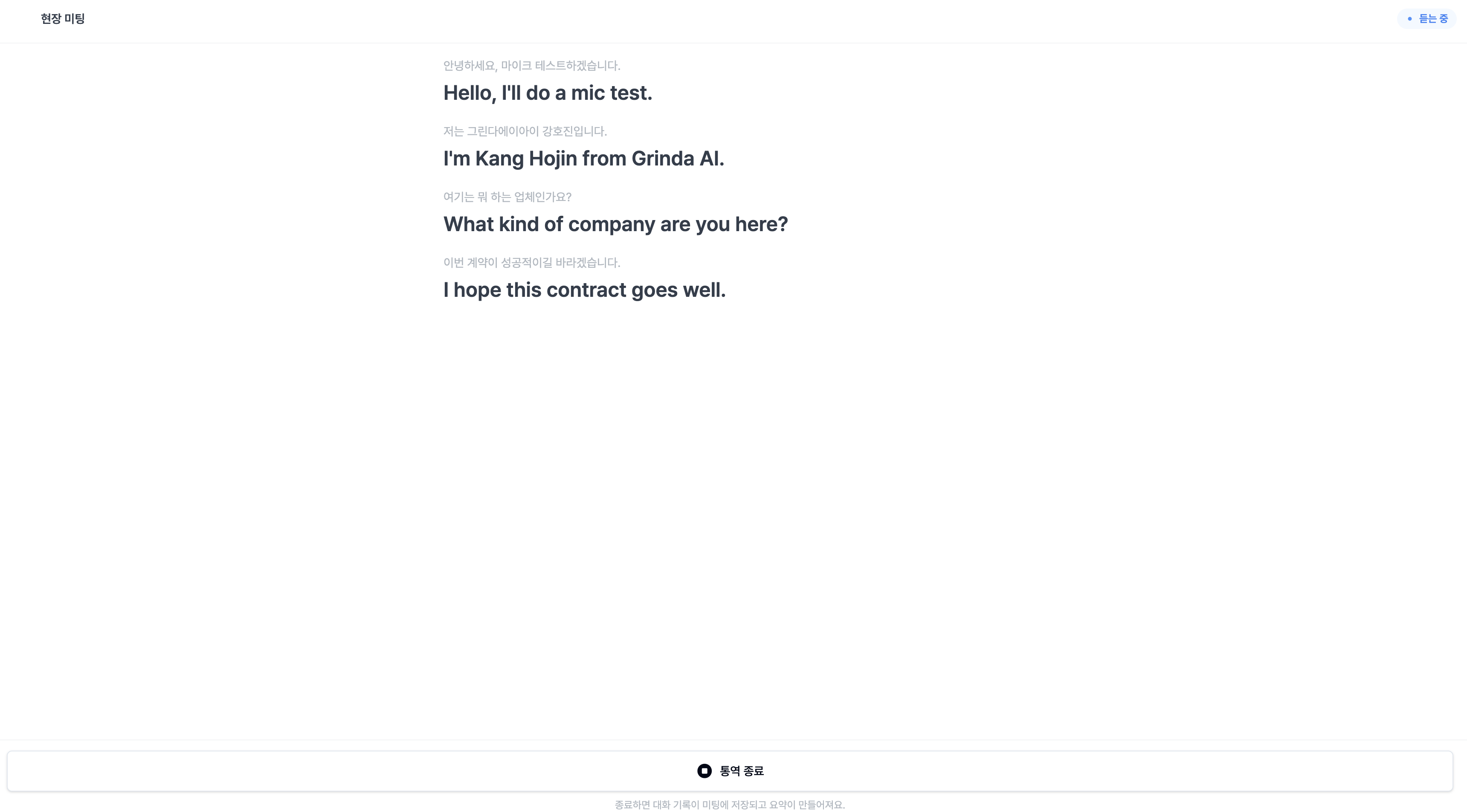
We also support face-to-face meetings at exhibitions or in the office.

  • You can register buyers who visit your booth without an appointment on the spot and immediately fill in their company and contact information. The meeting location is also recorded.

  • When you turn on real-time on-site interpretation, what you say into the microphone is immediately interpreted. We fixed the issue where the end of sentences were being cut off, and now the screen will let you know what the problem is if the microphone isn't being detected.

Meeting management is currently in beta. Please try it out and let us know if there's anything you'd like to see improved, and we will reflect it in the next update.

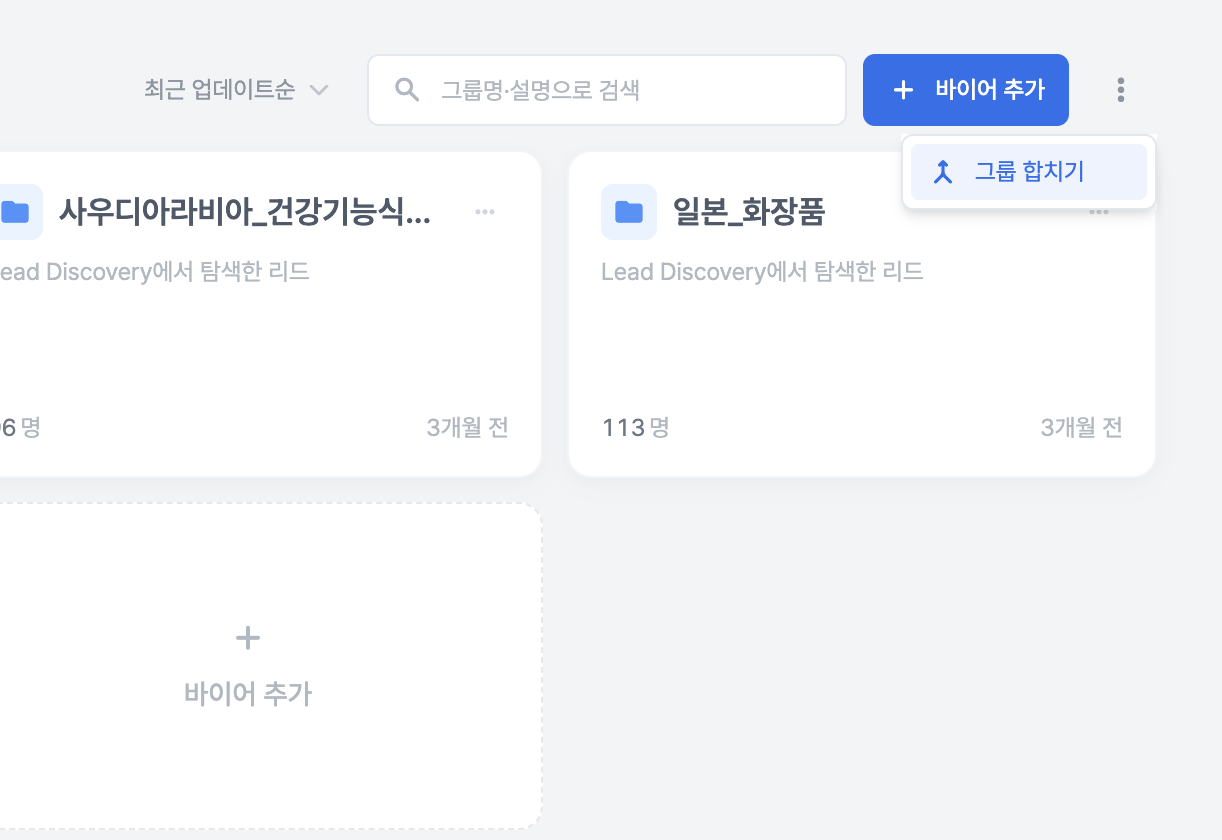
You can merge scattered buyer groups into one

If you have business cards received at exhibitions, lists uploaded via CSV, and buyers saved through searches piled up in different groups, you can now merge them into one.

  • In Buyer Management, just click the [More] menu → Merge Groups for the group, and set a new name to finish.

  • The recipients for campaigns that haven't been sent yet remain unchanged. We've ensured that organizing groups doesn't change who you're sending to, and we provide a reminder on the screen as well.

  • When you manually enter your first buyer, a group is created automatically, so you don't need to create a group first.

The app has become noticeably lighter

We have significantly reduced the waiting time every time you log in.

  • We reduced the data loaded when the login screen opens from 21.7MB to 2.3MB. Screen navigation after login has also become lighter, from 16MB to 2MB.

  • The dashboard, which used to take up to 24 seconds for accounts with a lot of data, now opens in 1.5 seconds.

  • If you use multiple workspaces, you will notice that switching is noticeably faster.

You can especially feel the difference in slow internet environments or on mobile.

Buyer Search, we show you why these are the results

  • Search up to 5 countries at once with a single search.

  • We added [Continue Reviewing] to review buyers you haven't seen yet, one by one. You can also re-review buyers you've already reviewed by clicking on them again, and we fixed the issue where reviewed rows seemed to disappear due to sorting.

  • We display the reason why a buyer was excluded from the candidates. We also unified the criteria for the issue where the number of results appeared differently on different screens.

  • We also reduced the time it takes for search results to appear.

Other changes

  • The [Buyer Matching] menu has been removed from the sidebar. If you access it via the existing URL, you will be automatically redirected to [Explore Overseas Markets]. It hasn't disappeared; it's being moved to a feature within Explore Overseas Markets.

  • We have aligned the estimated amount shown when changing plans with the actual payment amount. We show the pro-rated amount reflecting the remaining period before tax, and display VAT separately.

  • We fixed the issue where step-by-step sending dates for campaign emails appeared swapped and the issue where counts didn't match, and also improved email body quality and delivery rates.

  • You can immediately continue setting up campaigns that were left unfinished via AI recommendations from the list. The settings you had turned on when you resume writing will remain as they were.

  • The group the buyer belongs to is displayed as a badge in the email inbox reply list.

  • We fixed the issue where connecting to a representative in 'Contact Us' would hang without a response, and ensured that past conversations remain even if you end the conversation and start a new one.

  • We fixed the unsubscribe function for the notification emails we send so that it works properly. We also resolved the issue where the same notification was sent multiple times.

  • We fixed the issue where some screens appeared in Korean when users using non-Korean languages first signed up.

The focus of this update is "what to do after a reply."

We don't think Rinda's job ends at receiving a reply from a buyer.
We want to be with you until you actually meet, discuss, and lead to a transaction.

Please try out the various updated features and let us know if there's anything lacking, and we will fill those gaps in the next update.

v2.9.2.0

Subtle, yet convenient. — v2.9.2.0 Update

This time, rather than announcing major new features, we focused on refining the screens you interact with every day.

We have smoothed out the friction points in the flow of replying to received emails, selecting buyers for campaigns, and making inquiries.
Naturally, many of these improvements started from the feedback you provided directly.

Email replies, now without interruptions

We have significantly overhauled the experience of replying from the inbox.

  • AI reply drafts are now only when you want them. Instead of creating them automatically every time you open an email, drafts are generated only when you click the button. You won't be interrupted when you don't need them.

  • We fixed the issue where content being written would disappear. We resolved 3 scenarios where replies/drafts were being lost (thank you for the feedback).

  • We moved the reply composition window from being fixed at the bottom of the screen to within the conversation flow, so you can see at a glance which email you are replying to. We also cleaned up the Cc display, false positives for sending warnings, and input field alignment.

Campaigns, select exactly who to send to

We have introduced buyer checkboxes for campaign target selection.

  • Buyers who have already replied are automatically excluded. We've reduced the mistake of sending to the same person again. You can simply check them to include them if you want to send again.

  • You can select everyone at once with "Select All," and we've cleaned up the duplicate notification text that appeared for those who had already replied.

  • We also resolved issues where the screen would freeze or close during target selection, and where test sends would get stuck on "Preparing."

Questions? Now via phone and video call too

When you request to connect with a representative in "Contact Us," you can now be connected via phone consultation and online meeting consultation in addition to the existing chat.
You can get help faster using the method that suits your situation.

Other changes

  • The inbox and buyer list have become noticeably faster — they open much more smoothly even with a lot of data.

  • We fixed a display error where the 50% first-payment discount was shown as the regular price, and we now clearly indicate that it is "First month only."

  • In Buyer Search, instead of the search running as soon as you press a button, we changed it so you can fill in the search term and search after confirming.

  • We fixed issues where some text in the overseas market exploration and buyer search screens did not match the language settings.

Even if these aren't flashy, major features, we believe that when the screens you use every day become a little more convenient, your work becomes much easier.
Please try them out, and if you have any inconveniences or requests, feel free to let us know anytime. Your feedback shapes our next update.

v2.9.1.0

From market browsing to finding buyers, all in one flow — v2.9.1.0 Update

We have been releasing many beta features recently.
These features have been receiving enthusiastic support from our users, more than we expected.
So, we decided to take this opportunity to improve the overall experience.

In fact, in the previous update, the screen for browsing overseas markets and the screen for finding buyers were separate, which created a disconnect where users would think, "I've spotted a market here, so where do I find the buyers?"

This update focuses on connecting that flow and smoothing out the transition to writing emails to the buyers you've found.

Market exploration and buyer search are now one

Now, overseas market exploration and buyer search have been merged into a single integrated funnel.
When you're browsing overseas markets of interest on the map and find a place you like, you can proceed directly to buyer search right there without needing to switch screens.
The entry flow has become much simpler, and once you finish saving a buyer group, you can immediately move on to [Write Sales Email].

The map itself has also become more convenient.
We've optimized it to move smoothly even on low-spec devices, and cards are now organized as floating elements on the map, making it easier to scan markets at a glance.

If you edit the sample email until you're satisfied, Rinda will handle the rest

You might have had moments while reviewing sample emails to send to buyers where you thought, "I want to change this sentence like this."
Now, if you edit the sample body directly, Rinda will read your preferences (what content to include, what to remove, and how to refine it) and apply those adjustments to each buyer individually.

It's like editing once and having dozens of emails aligned to your tone.

Other changes

  • For subscribers, a dedicated manager will be assigned. You can check your dedicated manager in the app settings screen and book a meeting with a single button for a 1:1 consultation.

  • A Forward function has been added to the email inbox — you can forward received emails to others and specify multiple recipients at once (in chip/tag format).

  • You can now follow multiple conversations with the same buyer at a glance by linking them in the thread details.

  • The campaign list has become noticeably faster (the screen flickering when opening has also disappeared).

  • We fixed the issue where campaign names were displayed in Korean regardless of the seller's language settings.

  • Clicking on image attachments in reply emails now opens them correctly, and the translation button for foreign language replies appears reliably.

  • We have cleaned up the spam filter labels (e.g., SPAM) that were appearing in the subject lines of received emails.

We will continue to refine Rinda so that the flow of "finding, reaching out, and closing deals" remains uninterrupted.
Please try it out, and if you have any inconveniences or further requests, feel free to leave them with your dedicated manager or through this channel at any time.
Your feedback becomes our next update.

v2.9.0.0

From the moment you choose a country to export to, Rinda sticks with you — v2.9.0.0 Update

Recently, many of the CEOs visiting Rinda have been experienced in sales, but conversely, we've seen a significant increase in CEOs who are completely new to exporting and are struggling because they lack knowledge.

"I've found a buyer, but I don't know which country I should target in the first place."
This was a common concern shared by many of you.

In this update, we've prepared a new feature to help you take that first step, and we've also added a small feature to hear more from you.

Overseas Market Exploration is now open

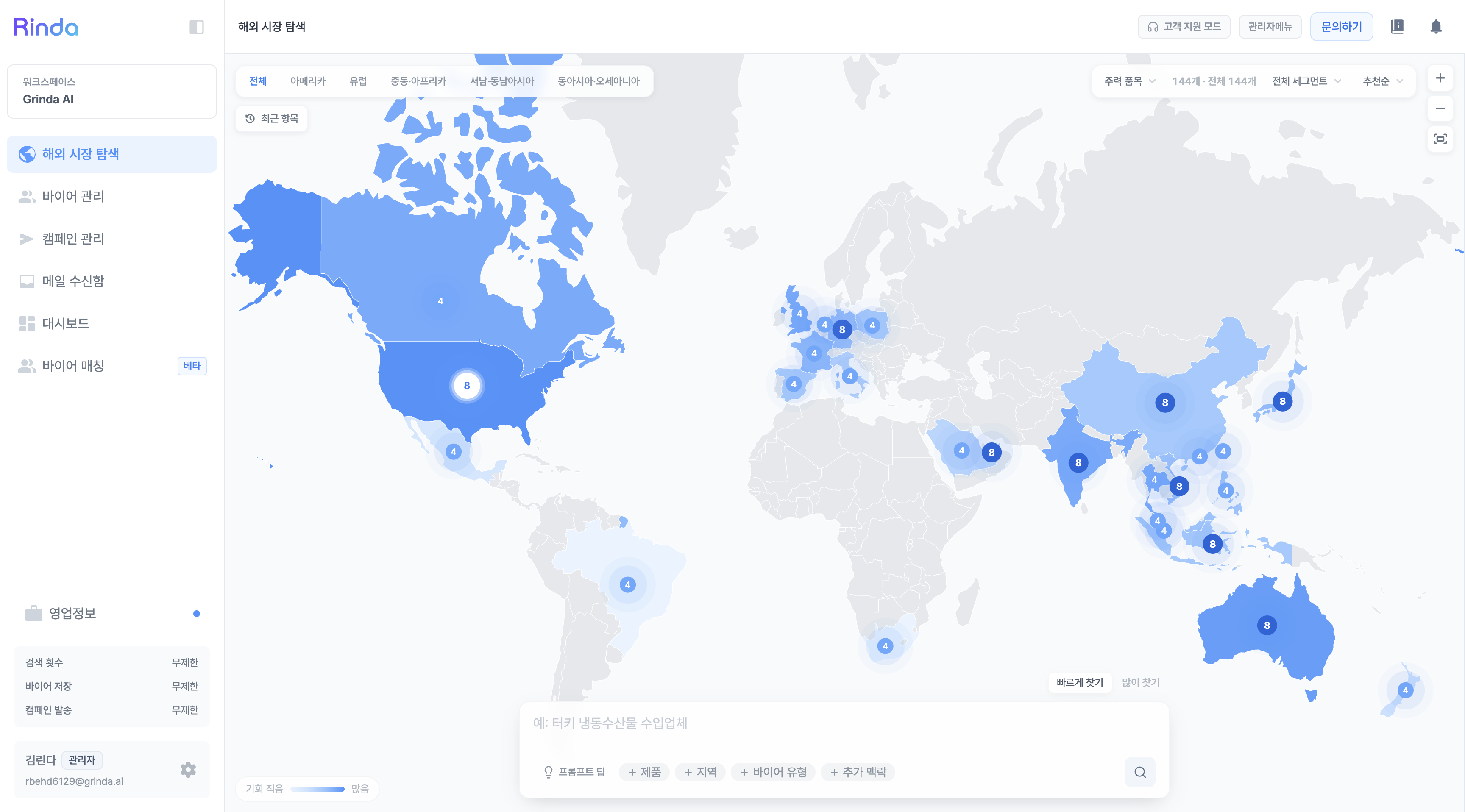
A new Overseas Market Exploration feature has been added to the sidebar.
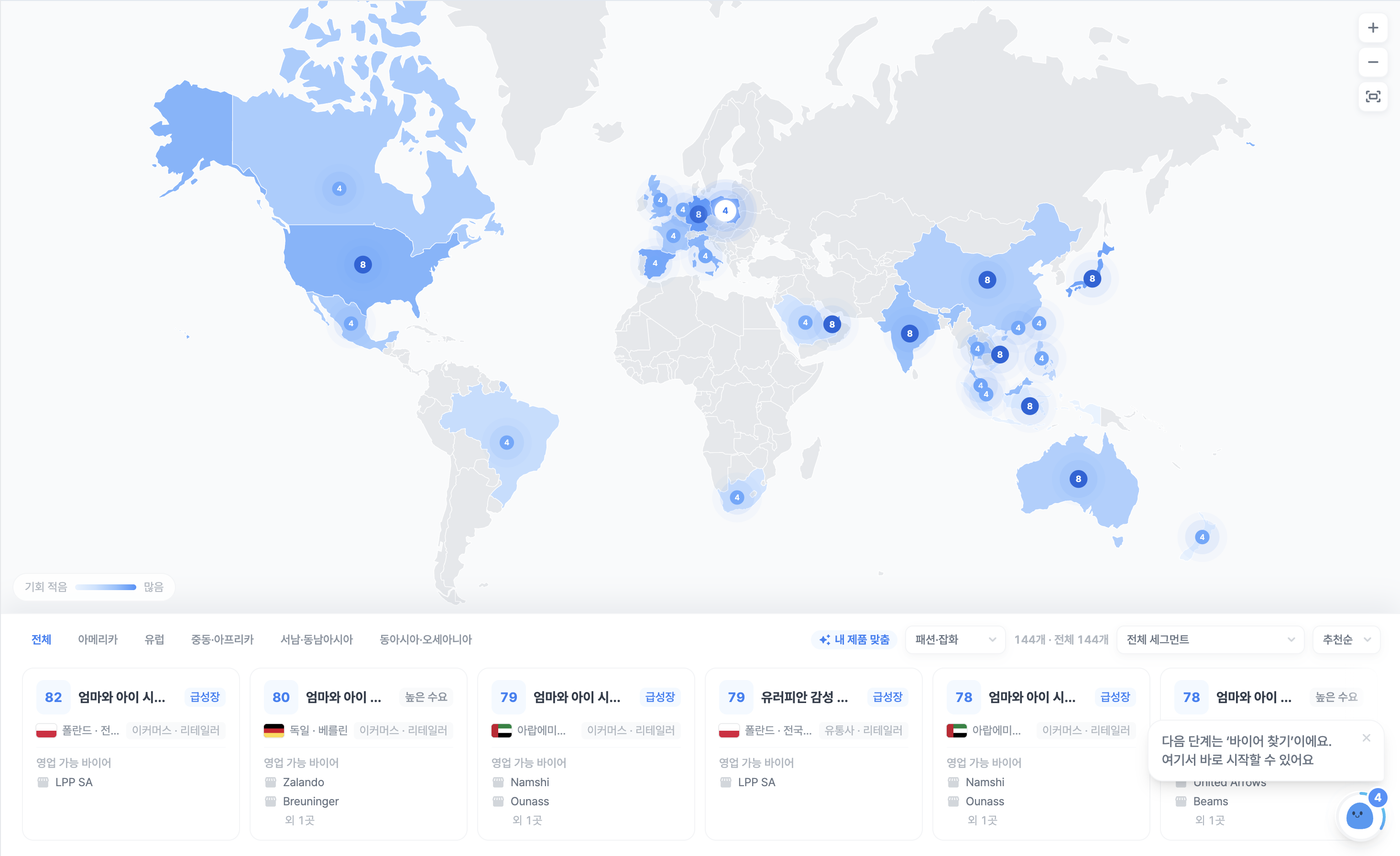
It's a feature that lets you open a map and see at a glance which countries are good for selling your products.

As you'll see when you click on each country, it doesn't just end with "It's promising."
Actual import volume, number of secured buyers, and source links are displayed as 'data evidence,' so you can personally verify and judge why that market is promising. The map color darkens according to the actual heat of the market, so you can get a feel for where it's hot (promising) just by scanning it.

Because it selects industries suitable for you based on the company and product information you've entered, we've reduced the chances of irrelevant markets being recommended. Even if you haven't entered your company information yet, you can still browse first, and we've also prepared a simple tour guide for those who are new.

This Overseas Market Exploration is a beta feature. We would love for you to try it out and let us know what you think.

Call Rinda from the messenger you use every day

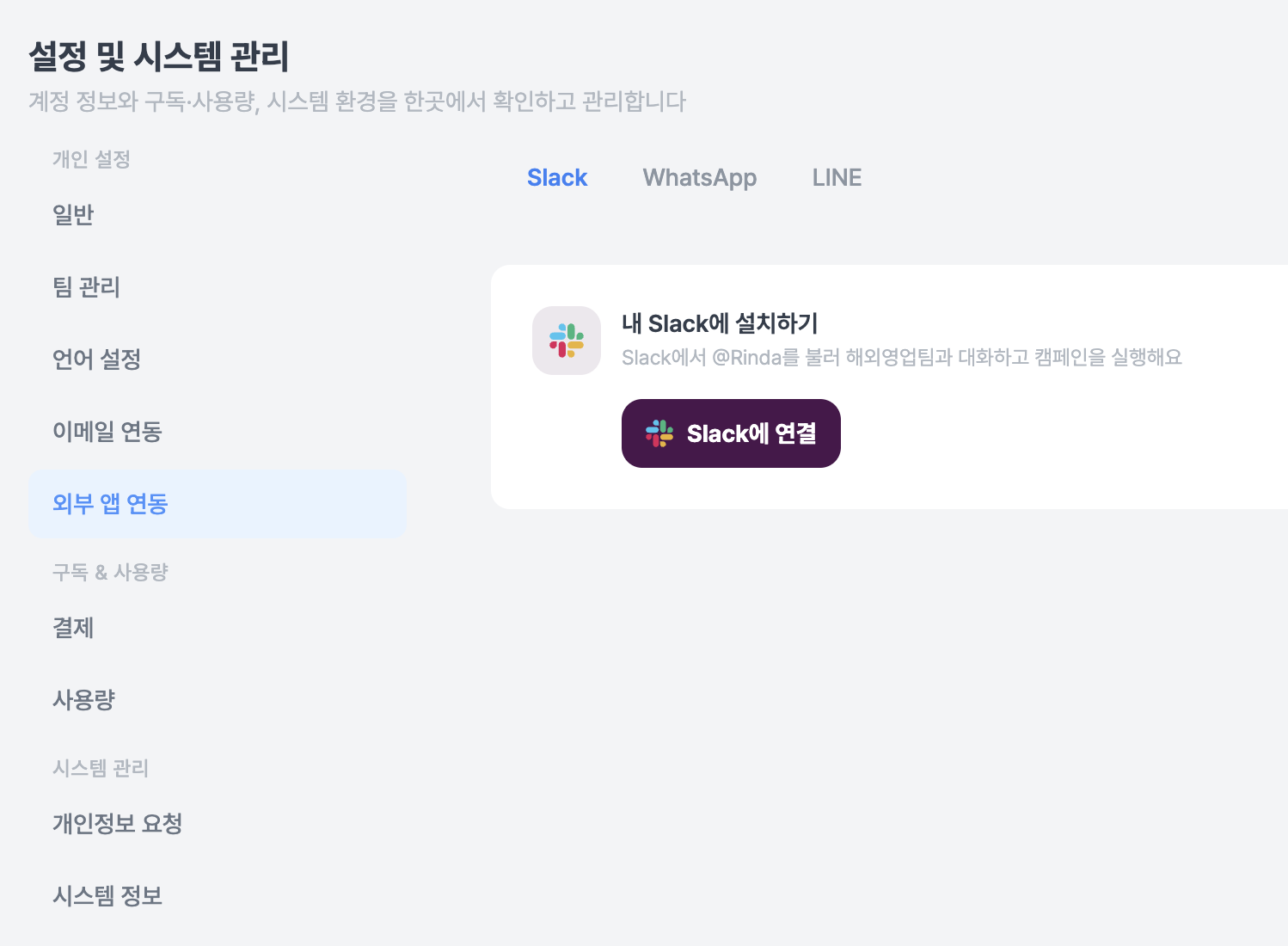
You can now connect Slack, WhatsApp, and LINE to Rinda. Just press the "Connect" button in Settings > External App Integration or scan the QR code to finish the connection.

Once connected, you no longer need to access this website.

If you send a message like "Find me a cosmetics buyer in Japan" in the messenger chat window, buyer exploration will begin, and you can receive the results directly via messenger.
You can then press the [Approve] or [Reject] buttons to move to the next step. Rinda can also understand if you send images or voice messages.

Even on days when you can't open your laptop while on a business trip, your sales won't stop as long as you have your phone.

This external app integration is a beta feature. Likewise, please try it out and let us know your thoughts.

If you get stuck with a question, a representative will take over immediately

You don't have to wait endlessly when the chatbot can't find an answer.
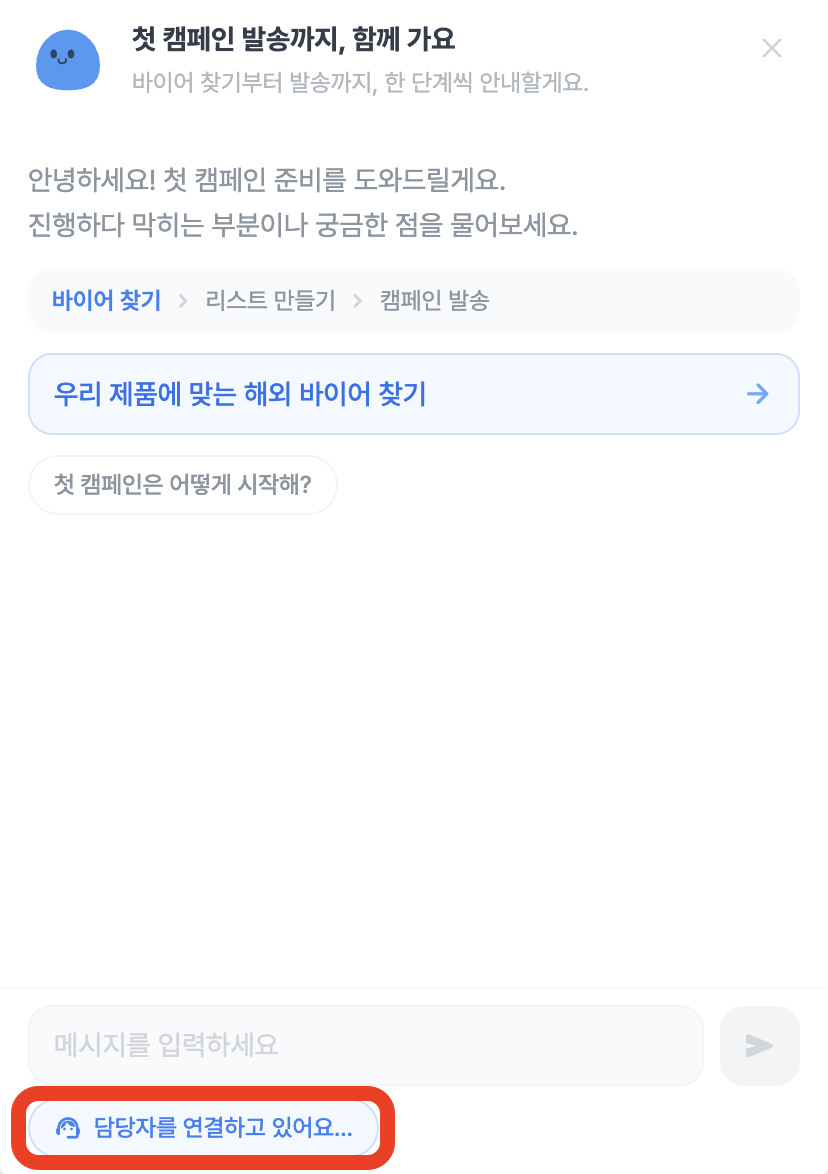
With a single "I want to connect to a representative" button at the bottom of the chatbot, a real representative will take over the conversation and answer you directly.
There's no need to fill out a separate inquiry form or wait for an email reply.

Even in conversations that have already ended, you can ask again at any time by clicking [Start new conversation].

We've tidied up the inbox screen overall

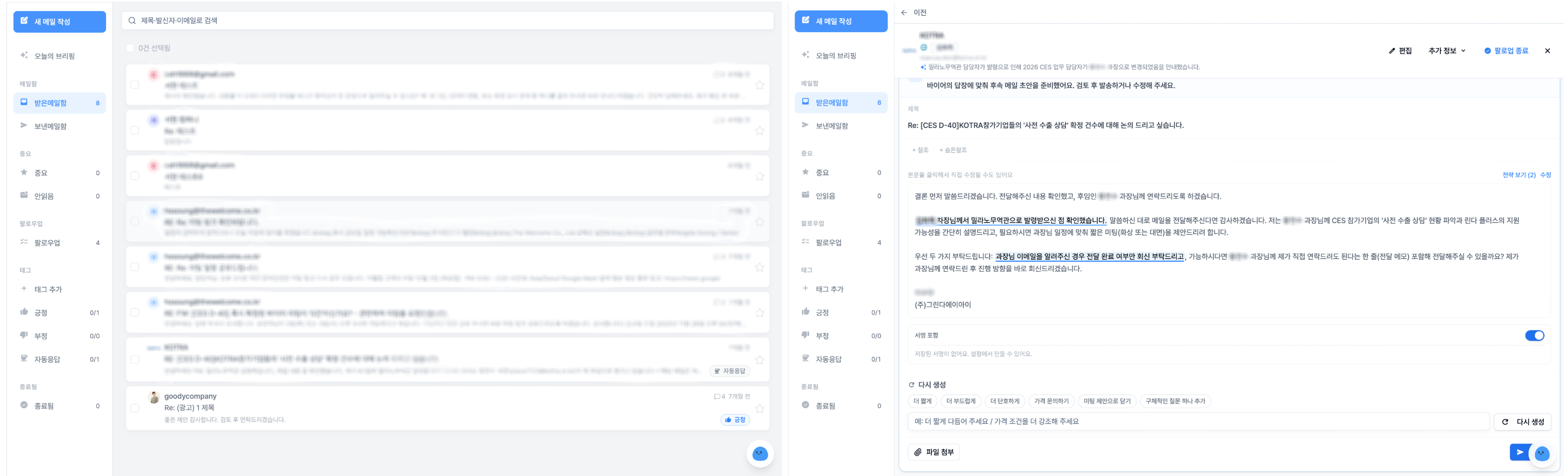
We've cleaned up the screen and now provide conversation summaries when the exchanged emails get long.
You can grasp what has been discussed without having to re-read long threads from the beginning.

When writing a reply or a new email, you can now choose which account to send it from, and spam that kept coming in by bypassing the follow-up termination can now be blocked by sender.

Phishing emails impersonating our domain are automatically hidden.

Campaign emails have become more accurate

We fundamentally fixed the issue where items like names and company names inserted into emails were rarely sent in the {{name}} format as is.
Now, the preview and the actual sent version always match.

If you request edits via chat, such as "Change to step 2" or "Change to English," it will be properly reflected, and the edits will remain even if you refresh the screen.

Getting started has become much easier

If you just enter your company website address, Rinda will automatically find and fill in your company information and product details from the web. If you don't have a website, you can just tell us your company name.

Other changes

  • Check how many pages of your proposal were viewed — Tracks the buyer's viewed pages and displays them in the sending status

  • Home dashboard reorganization — Reorganized around views, replies, and meetings, and added a reply line to the trend chart

  • Improved buyer exploration result screen — You can switch between [Buyer List ↔ Designed Campaign] tabs, and you can directly narrow down or expand the search range

  • Email signature check — Notifies you in advance of signals that might be classified as spam, such as signatures different from the sending address or excessive links

  • Changed the sidebar menu name from 'Find Buyers' to 'Buyer Exploration'

  • Usage for those on the unlimited plan is now accurately displayed as 'Unlimited'

  • Fixed numerous large and small errors, including search accuracy and speed, loading immediately after login, and help links

We have also taken care of protecting our customers' data.
In this update, we have thoroughly inspected and supplemented data access paths between workspaces and strengthened email sending stability.

As always, if there are any inconveniences or parts you think "it would be better if it were like this," please feel free to tell us via the chatbot now.
A representative will take over immediately and listen.

v2.8.4.0

We've made a few changes from the start — v2.8.4.0 Update

We believe that a great tool shines not through flashy features,
but when your daily workflow proceeds without any friction.

In this update, we've smoothed out the initial experience of starting with Rinda,
and significantly reinforced the reply and buyer management features you use every day.

Getting started is now easier

We've refined the initial onboarding flow so that new Rinda users don't get lost before their first search or setup.
By clearing up hurdles in the early stages, such as country selection, you can now move naturally from signing up to actually finding buyers.

Also, Gmail integration is now available in the trial version.
You can connect your email account before making a payment to experience the actual sending process, making it much easier to decide whether to adopt the service.

Reply and buyer management have become more robust

Email reply drafts now have version history.
If you're not satisfied, you can revert to a previous version, and if you ask to rewrite it, we'll refine it naturally based on the previous draft.
Reply notifications have also been expanded so you can receive them for multiple people and by category.

In buyer management, you can now view "Ongoing Brokerage" and "All Buyers" separately,
and apply detailed filters using four filter buttons and a score slider.

When buyers are added automatically, AI now verifies whether they are fraudulent or impersonators to increase reliability.
Buyer cards now also display website addresses and company introductions.

Other changes

  • We've aligned the test send/preview of campaign proposals to look exactly like the actual send (body + signature).

  • We've added a screen that guides you to an upgrade if you exceed your plan limits, specifying which limit was reached.

  • AI matching scores and email verification results columns have been added to lead CSV exports.

  • Emails that have requested personal information deletion are now globally blocked from being collected again.

  • We've also made various small and large improvements to copy, accessibility, and stability across many screens.

Rinda will be by your side to ensure you can use every small part of your workflow comfortably.
Please try out the new features and let us know what you think at any time. Your voice shapes our next update.

v2.8.3.0

Refinement, and New Preparations — v2.8.3.0 Update

Half of 2026 has already passed.
We would like to thank the 1,100+ CEOs who have been using the Rinda service, and
the concept for this update is "Refinement and New Preparations."

To be honest, there have been many changes to the interface, new features added, and things that used to work suddenly not working...
From our team's perspective, it has been a series of challenges.

However, thanks to your trust and feedback,
most features have gradually stabilized and are now working as intended.

Of course, we know there are still some inconveniences,
and even from our perspective, there are areas we can refine to make your experience more convenient,
so this update focuses primarily on those improvements.

Creating and refining campaigns has become much easier

"I clearly asked you to write it shorter, but it's still the same?"
Some of you may have felt this frustration when recreating emails.
Sometimes, your requests weren't reflected well because they were blocked by fixed length or tone rules.

Now, the instructions you write will be prioritized over other rules.
"Must-include content" will not be missed, and we have resolved the issue where instructions would disappear due to overlapping tasks.
We've also added a translation toggle to check your preferred translation immediately, and you can refine emails in the same way on the campaign review screen.

We've organized not just individual emails, but the entire screen for setting up campaigns.
We added a new timeline to see the campaign flow at a glance, and the pre-send overview screen has been cleaned up by removing empty widgets and scattered numbers, consolidating them into a neat single line.
When creating AI proposals, you can now directly toggle 'Include meeting request' on or off, and we've accurately calculated the number of sendable recipients to prevent accidental sending when the count is 0.
The 'In Preparation' tab has been renamed to 'Before Start' to avoid the misunderstanding that it runs automatically.
We've also removed confusing input fields when editing emails for the first time, making it much less effort to complete a campaign.

Finding buyers, now you can see how much is left

An estimated time of arrival (ETA) is now displayed while searching for buyers, reducing the time you spent staring at the screen wondering when it would finish.
We also show the conditions being used for the search more clearly in the progress card and history while the search is in progress.
The chat card that appears after the search is finished has been decluttered for better readability, and the screen you were viewing is restored even if you leave and come back.

Other changes

  • Resolved the initial entry issue where 'Start' could not be clicked after selecting a role, allowing new users to start without obstacles.

  • You can now edit the workspace name directly from the sidebar.

  • Fixed an issue where the number of buyers was incorrectly displayed as 0 in the AI Overseas Sales Team mission summary.

  • Organized the sales material structure around company information and product information, making it easier to fill in the necessary materials.

  • Removed expressions that pressure for meetings or time appointments in the cold email body, making the initial greeting email more natural.

  • Enabled the input of legal (sender) addresses in company information and added a final check before sending to better comply with email sending regulations.

  • Improved email generation to strictly follow your selected language.

  • You can now check the first-payment discount price directly on the trial expiration notice screen.

  • Added links in the Help Center guide body that go directly to the relevant feature screens.

  • Increased email generation speed (internal processing lightened by approximately 49%).

  • Extensively refined display and operation errors throughout the campaign and buyer search screens for more stable performance.

And in the next update,
we are thinking about creating the "AI Overseas Sales Team" as a new "App" form so that you can use our Rinda service elsewhere.
However, since the "AI Overseas Sales Team" is still a beta service, we believe that preparing it for a successful official launch is the priority,
so we plan to refine this part well.

We will continue to refine the screens you face every day into tools that are more intuitive and easier to use.
Please let us know if you find anything awkward while using it. A single small piece of feedback becomes the starting point for the next update.

v2.8.2.0

Not overwhelmed even if it's your first time, thorough even in niche markets — v2.8.2.0 Update

Recently, we've seen a significant increase in new users meeting Rinda for the first time.
Thanks to your great support, Rinda has been able to welcome 1,000 client companies.
We would like to take this opportunity to thank all of you who have joined us in reaching this milestone of 1,000 client companies.

As many of you are new to our service,
for this update, we focused heavily on the idea: "Don't get lost if it's your first time, and make it even more convenient for those already using it."

That focus led to improvements in three major areas:
Easier to start, broader buyer search, and a completely new screen for campaigns.
Let me walk you through them one by one.

Not overwhelmed even if it's your first time — Start by watching, right after signing up

"I signed up, but what should I do first?" "How do I use Rinda?"

This is the point where most new users get stuck.
While there are explanations for each menu, there wasn't a dedicated time to introduce what this service actually is.

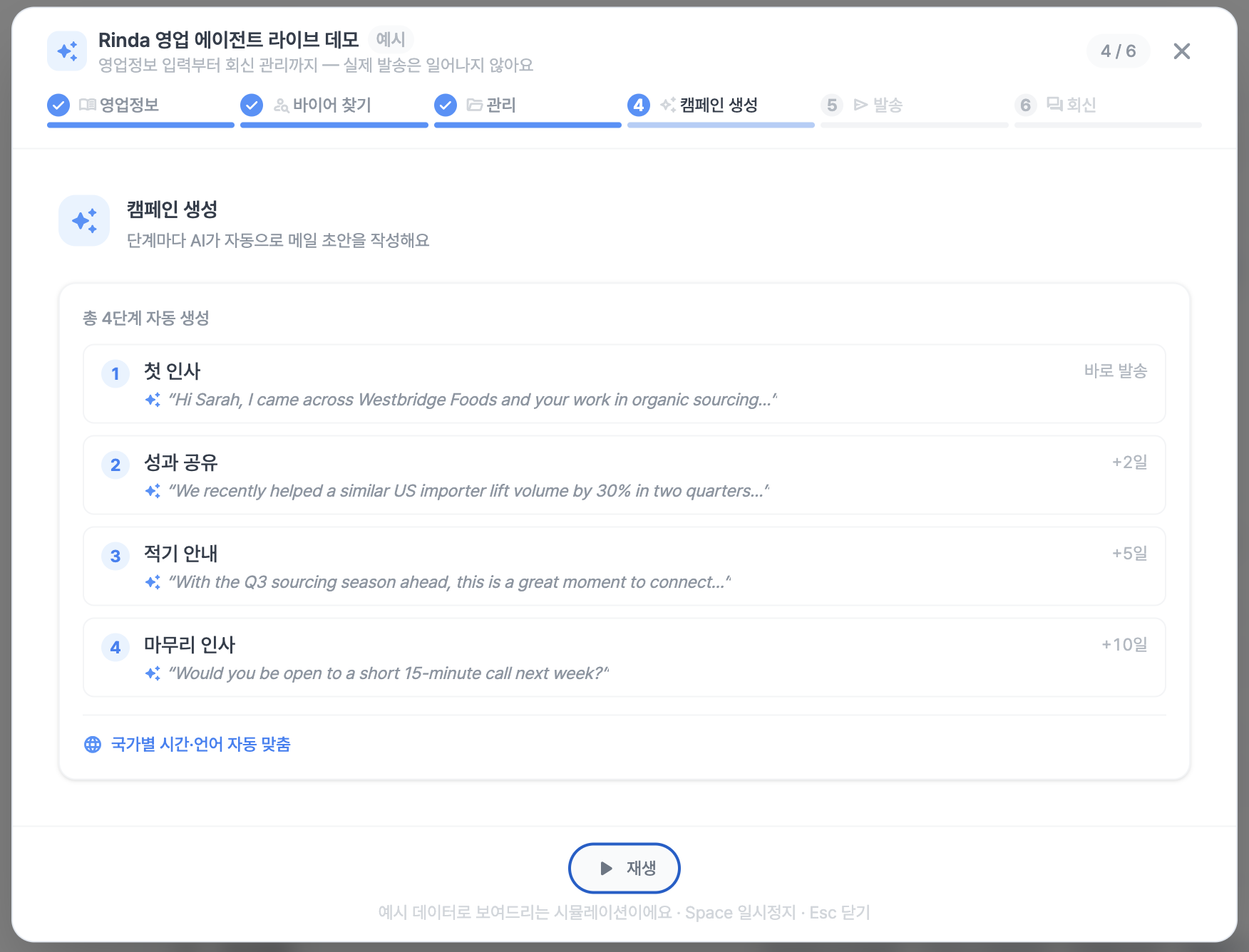
Now, right after signing up, you will be guided by a live demo that shows exactly how Rinda works on the actual screen.
You can follow the process of finding foreign buyers and sending emails through short scenes, so you can get the hang of it immediately without hesitating in front of the first screen.

You can watch the demo again at any time, so if you're in a hurry, feel free to skip it and watch it later at your own pace.

The campaign creation screen has been completely redesigned

We have put the most effort into the screen where you create and send campaigns.
The campaign management screen is the core of our Rinda service, and as such, it inevitably had complex features and screens.

So, we redrew the whole thing, completely restructuring the screen so that both existing CEOs and new users can understand it quickly.
We reorganized the step editing into role-based cards (Overview of flow, Step details, Sending settings), making the entire creation process much smoother.

  • Auto-save as you edit — Even if you just change the title, the images, formatting, and line breaks in the body remain preserved. The campaign you are working on won't disappear even if you close the tab.

  • With one "Send" click — You don't need to wait for writing to finish and press another button; everything from writing to sending happens in one go. If there are 0 recipients, we prevent empty sends.

  • Don't send to the same buyer twice — If there's a situation where you might send an email to a buyer you've already contacted, we'll double-check with you before sending. You can keep intentional resends while preventing accidental duplicate sends.

  • Real-time progress — Instead of a frozen, empty screen while creating a campaign, we show you in real-time how far along the process is.

  • Multiple campaigns at once — You can select multiple campaigns from the campaign list to delete them or change their status all at once.

  • Accurate status — We fixed issues like "It says 'in progress' even though it's all sent" or "New campaign can't be created for a finished group," and made statuses like 'Receiving replies', 'Paused', and 'Postponed' clearly distinguishable at a glance.

  • Cleaner interface — You can select multiple lead groups at once to see aggregated statistics, and search for and specify multiple sending accounts. We also unified confusing terminology (Mailbox, Buyer).

We focused on redrawing the complex, scattered campaign creation process into a natural, single line: "Select → Confirm → Send."

Even local buyers in niche markets — Finding them more broadly

Now, buyer search utilizes a total of 6 search engines (Google, Bing, Yandex, Baidu, Naver, Yahoo) together.
You can meaningfully find local companies even in markets where Google doesn't reach well, such as Russia, China, and Japan.

We also removed regional restrictions, so you can now search targeting any country in the world.
If you tell us conditions like "Southeast Asia focus, large distributors only" via chat before searching, it will be reflected in the results.
If the result is 0 or the search fails, your usage quota will not be deducted.

Other changes

  • Received replies, with AI drafts — AI suggests draft replies as cards for received emails. You can edit them on the spot, choose to include a signature, and attach files to send. We also reorganized the automation for classifying and processing replies, making the on/off settings clearer.

  • Auto-fill my business information — Just enter your company website address, and we will fill in all items like company introduction, products, and customized information at once.

  • Payment screen accuracy — We fixed the issue where amounts were displayed incorrectly on receipts/invoices, and we are offering a 50% discount on the first payment.

  • Buyer management — When moving buyers to a group, the target group name is displayed, and columns are matched more accurately when importing via CSV. When registering individual buyers, if the email already exists, it is naturally merged into the existing group.

  • The login screen opens faster, and for those using it overseas, we have fixed missing language translations for dates, numbers, and guide text in various places.

We tried to align every small screen and button with the "actual workflow of an export manager."
If you find anything uncomfortable or need anything else while using it, please let us know at any time. Your feedback is the starting point for our next update.

v2.8.1.0

Inquiries made easy, your overseas sales team becomes even more perfect! — v2.8.1.0 Update

It has been a very hot and humid week.
Even amidst that, Rinda has continued to push updates.

"Where can I see this data?", "How do I do this?"
Have you ever felt stuck or struggled to find a menu while using Rinda?

In this update, we are introducing a new chat assistant that you can ask for help from anywhere on the screen.
In addition, we have refined the Buyer Search and Email Inbox to be smarter, and made adjustments to ensure you are ready for sales as soon as you sign up.

Ask anything, anytime, from anywhere on the screen

Now, you can pull up the chat assistant from any screen in Rinda to ask questions immediately.
Not only can you ask about your data, but if you get stuck, you can request to connect with a representative directly within the assistant,
so there's no need to send separate emails or search through menus.

For example, if you are working on a campaign and wonder, "What was the reply rate last week?", just ask without leaving the screen.
Once the answer is provided, we also offer suggestion buttons so you can choose follow-up questions with a single click.

Buyer Search, now with three dedicated AI agents

Many of you have been using the existing "AI Overseas Sales Team" menu.
To help you find buyers more perfectly and assist with your sales, we have partially integrated the features of the "AI Overseas Sales Team" into "Buyer Search".


Now, three AI agents—Team Lead, Explorer, and Analyst—divide the roles,
guiding you through everything from planning your search to organizing results and sending emails, all within a single conversation.

In particular, because the 'Strategy Analyst' proposes a solid search plan after conducting market research first,
you can engage in evidence-based prospecting rather than vague searching.

We have also significantly improved the quality of overseas buyer prospecting.
It recognizes industry characteristics to find more suitable buyer types, and the searchable country range has been expanded, allowing you to discover buyers in markets that were previously difficult to reach.

We have refined the closing flow so that the agents suggest the next steps (creating campaigns, organizing groups) once the search is complete,
and we fixed the issue where companies without contact information appeared at the top, ensuring that buyers you can 'contact immediately' are shown first.

Email inbox and replies have become more convenient

We have revamped the new email composition screen to be cleaner.

Drafts created by AI can be edited, translated, or regenerated directly in the card,
and if you edit them comfortably in your own language, they are automatically translated into the recipient's language for you to double-check before sending.

Inbox search has been expanded to include not just subject lines and sender names, but also the content of the email body, and notifications have become smarter to alert you only about truly important replies.

Other changes

  • We have generally cleaned up the campaign management screen. We unified the terminology to 'Campaign', display groups connected to the campaign together, and fixed the 'Sending' badge that was causing confusion.

  • We fixed the issue where the campaign list was broken on mobile and tablets, so it is now easy to view on small screens.

  • The campaign list screen now opens much faster.

  • We prevented buyers who are already involved in another campaign from being added to a new campaign as duplicates.

  • We fixed display errors for open rates, hot leads, and activity feeds on the dashboard.

  • We cleaned up the email integration screen and added an automatic signature saving feature and a close button for the pre-send confirmation warning.

  • We improved the accuracy of automatic column mapping for buyer imports and fixed the import completion notification.

We believe that every small inconvenience adds up to a better sales experience.
Please feel free to share any thoughts or features you need while using the service.

The feedback you send is the biggest hint for our next update.

v2.8.0.0

Welcome back with a major update full of convenience features

We are back with a major update after a while due to internal schedules and holidays.

In the meantime, we have received a lot of feedback from you, such as:
"It's hard to see at a glance if my campaigns are running well"
"Managing replies is too time-consuming"
"Entering sales information is inconvenient"
and so on.

So, this update focuses on making those three areas — Preparation, Operation, and Management — more automated and easier to see at a glance.

My Sales Information has changed significantly

We have improved the design and added convenience to the 'My Sales Info' section on the bottom left, making company and product information, email signatures, etc., much easier to understand.

First of all, any information you enter in My Sales Info is automatically saved and filled in for you.

You can now add a logo to your company information,
upload multiple images for products,
and keep sales materials like brochures in a single library.

In particular, email signatures are now organized by 'Signature → Language', and AI creates signatures for all languages at once.
The legal sending address (mandatory opt-out information) required for emails sent to buyers is also automatically filled in,
and your company logo is naturally integrated into the footer of sent emails.

Check if campaigns are healthy at a glance, and let us handle the replies

The newly added Campaign Health Dashboard shows your campaign status on a scale of 0 to 100.
You can click on the mini-card to expand it and see exactly where the problem is.

Here, Campaign Health is
"a metric that tells you if the campaigns you are sending are being delivered properly without running into legal issues or spam filters."

Meanwhile, reply management is also running more autonomously.

  • We send follow-up emails to unresponsive buyers according to business days,

  • Emails that return as Out of Office (auto-reply) are resent during the recipient's business hours,

  • And if a reply comes back saying "I am not the person in charge," it is automatically forwarded to the alternative address provided.

If a positive reply or a request for a meeting comes in, we will notify the person in charge immediately via email.
Sending times are now also set to the buyer's local business hours (09:00–18:00) by default, so they arrive at a more natural time.

Even without data, get buyer recommendations from your first search

Even if you are just starting out and lack information, we have added Cold Start Buyer Discovery, where Rinda selects and recommends combinations of markets and buyers.

The search begins after you confirm your product as if having a conversation, and the progress is shown in step-by-step cards.
Buyers you have already registered are marked as 'Already Registered' in the results, so you can save them without duplicates.

Other changes

  • We have revamped the buyer management detail page and added a normalization tool to organize company names, websites, and countries at once (provides a preview of matching counts before application).

  • You can correct the classification results of received replies with 👍/👎, and that feedback is used to improve classification accuracy.

  • We have increased the email sending limit for the Team plan from 600 to 2,000 per day, and from 15,000 to 50,000 per month.

  • We have fixed several bugs, such as the issue where Korean was mixed into multilingual emails, the issue where stopped campaigns appeared as 'In Progress', and the issue where some replies were missing.

As this is a major update we've been working on for a while, please try it out and let us know anytime if anything feels awkward or inconvenient.
Your feedback shapes our next update.

v2.7.3.0

Lightweight sending, rigorous legal compliance. — v2.7.3.0 Update

If our last update was about "making the screen you see every day a little more solid,"
this time we've added significant changes to help both newcomers and those sending actively every day work more naturally.

While we didn't receive direct feedback from CEOs, we saw areas that needed internal review.

"It's a burden to have to buy a domain just to start sending."
"I have multiple mailboxes, but I want to group them into one campaign."
"I'm always worried about whether it's legally okay to send to European customers."

You can start sending immediately without a domain

The step of purchasing and verifying your own domain was the biggest barrier to entry. With this update, a pool of 11 public sending domains operated by Rinda has been opened.
You can start sending emails immediately after signing up, and you can naturally transition to your own domain once it's ready.
We have also simplified the UI for domain count limits per plan.

We've also refined the stability of the sending process itself.
Improvements include automatic checks every 6 hours for domain authentication (DKIM / SPF / DMARC), a conservative sending speed with an average interval of 10 seconds, and even distribution of remaining volume until midnight when 80% of the daily limit is reached.
This will reduce the risk of damaging your reputation by sending everything in a burst.

One campaign, multiple mailboxes

You can now select multiple sending mailboxes simultaneously for a single campaign.
You can naturally distribute the same campaign across multiple employees and domains, ensuring that even as sending volume increases, it doesn't get skewed to one side.

We've also redesigned the campaign management page.
The Active Campaigns / Priority / Cold Start sections are now clearly separated for a quick overview,
and the empty state when you first enter is branched into 4 steps, naturally showing you "what to do first."

We've also tidied up other campaign-related details.
Added a product selection step to AI sequence suggestions, automatically recalculated pending sending schedules when sequence steps are modified, automatically blocked resending to leads who have replied or bounced, translated AI draft previews into the user's language, prevented Korean text leakage when generating multilingual emails, and ensured that drafts left empty during campaign creation are automatically cleaned up.

Send with peace of mind — Global compliance automation

For those doing business overseas, the biggest concern is undoubtedly the policies of the target country.
We've made it possible to automatically handle email sending policies such as GDPR, CAN-SPAM, cookie policies, personal information requests, and email tracking consent within Rinda.

The sender's postal address is automatically injected into every email footer, tracking is automatically turned off for EU/UK leads, and a cookie policy page and a self-service page for personal information requests have been newly created.
A consent verification wizard has been added during CSV import, allowing you to record the source of consent for collected leads all at once.

It's also become more convenient for overseas customers who send requests.
After applying via the "Manage My Data" link in the footer and clicking the confirmation email received in their inbox, they are automatically guided to a tracking page where they can check the status of their request at any time.
There, they can see the receipt date, processing deadline, and current stage at a glance, and will receive the results via email upon completion.

This effectively satisfies the "response visibility" obligation of GDPR Art. 15 all at once.
The page copy itself has been written in plain language rather than legal jargon — phrases like "See what information you have about me" or "Stop receiving marketing emails."

A sender postal address input gate has been added to sequence activation, so if you are blocked from activating, please fill in your address in the workspace settings first.
Since this is in the beta stage, please let us know if there are any shortcomings as you use it, and we will improve them quickly.

Other changes

- Refined the look of emails as seen by the recipient. It is now aligned in the order of Body → Sender Signature → Company Registered Address/Unsubscribe Footer, appearing with a natural hierarchy like an email written by a human.

- Leads are preserved even if you delete a buyer group (previously they disappeared together). We also fixed an issue where the button wouldn't click due to URL length limits when starting a campaign with a large group. We also fixed an issue where it looked like "the group had disappeared" when entering via a group link from a different workspace.

- Reply emails — We ensured that the screen doesn't jump to an unexpected place after sending a reply, and drafts remaining in the queue are automatically cleaned up. We also quickly blocked an issue where raw data was briefly exposed to some users in free-text fields.

- Mail Inbox — Reply searches now include ended threads, and spam/complaint/bounce notification emails are automatically hidden. The mail inbox digest feature, which had low usage, has been removed.

- Email Connection — We fixed an issue where campaign starts or account disconnections were blocked when only one mail account was connected. We also collectively reinforced 3 Gmail/LinkedIn connection popup flows (identification errors, error displays, window closing).

- Onboarding Milestone widget's pulse blinking, circle size, and completion status colors have been refined to match the design system, and we fixed a bug where progress status disappeared after a refresh.

- Copy Unification — "Buyer List" → "Buyer Group" (6 languages), "Help Center" → "User Guide", and expressed LinkedIn warming-up/full-speed in user-friendly copy. Line breaks in Japanese sequence progress cards have also been stabilized. The cookie policy page has been rewritten in detail, including retention periods, blocking methods by browser, and contact information.

- Payment Stability — We've cleaned up payment-related areas all at once, including Toss recurring payment automatic compensation + automatic retry on failure, payment currency verification, extension of expired trials, and strengthened security verification.

- Admin Console — The "Buyer Discovery Cost Analysis" page and "Personal Information Request" page have been newly created, enabling operational visibility and compliance response from a single screen. Also, we cleaned up parts where processing action buttons were exposed to members without authority, separating them cleanly by permission.

This update can be summarized with three keywords: "Start lighter, send more naturally, and with more peace of mind."

Reducing the burden of entry with a domain pool, naturally distributing sending with multi-mailboxes, and lightening the hearts of those doing overseas business with compliance.

These changes all started from the feedback you sent us.
If anything looks awkward or out of place, please feel free to let us know.

v2.7.2.0

Making your daily screen more robust — v2.7.2.0 Update

If our last update was about gathering new features all at once,
this time, we focused on refining them to be more solid and seamless, so they can truly become tools you use all day long.

"Replies sometimes don't show up," "Large files won't upload," "Campaign proposal previews are too slow"
Please consider this our response to those issues.

  • The time it took for the first preview email to appear when opening a campaign proposal has been reduced from 4 seconds to about 1 second.

  • The proposal screen itself has been redesigned with a focus on "previewing the email to be sent."

  • We've also resolved various minor frictions at once, such as stabilizing auto-save for sequence steps, crashes during quick editing, indicator positioning, and repetitive toast notifications.

  • We've fixed all 3 cases where reply emails were appearing late or not at all in the inbox. Star toggles now immediately reflect in the infinite scroll cache, and AI reply drafts now support 4 languages: Korean, English, Indonesian, and Japanese.

  • CSV uploads are now faster and more stable — standard format uploads (Company Name, Email, etc.) are mapped instantly without AI calls, and we've fixed the issue where the "Register" button wouldn't click for large files with over 50,000 rows. We also blocked cases where registrations were completed without any mapping for company name, email, or website identifiers.

  • We've blocked the incident where campaign emails were sent in Korean to leads in certain Spanish-speaking countries (14 countries including Ecuador, Guatemala, Panama, Venezuela, etc.), and simplified it so that even in countries without mapping, the AI will automatically write in the local business language.

  • Buyer search results now include a 5-level evaluation badge, evidence summary, confidence score, and tooltips explaining "why it was excluded." We also filter out noise such as anonymous LinkedIn members / misidentified company names on foreign language pages.

  • Payments (Paddle branch) now automatically show local currency and amounts based on IP, and we've strengthened payment-related stability, including VAT breakdown display / allowing payment for expired trials / Toss refund processing.

  • Chinese (Simplified) + Thai UI have been added, bringing the total supported languages to 6. We also extensively cleaned up cases where Korean was leaking out incorrectly.

  • The incident where users with multiple workspaces under an admin account saw a blank screen upon first entry has been resolved, and we've blocked "zombie account" cases where new sign-ups would stall because a workspace wasn't created.

  • AI Assistant (Beta) — Fixed minor issues such as conversation response cut-offs, chat input locking, and progress bar display.

  • Sidebar subscription status display — Fixed issues where free trial ads were incorrectly shown to paying users, or where it displayed "Expiring soon" even after expiration. Expiration/non-payment will now be clearly indicated with a red warning.

This update is less about flashy new menus and more about refining the screens you encounter every day to make them one step more robust.

The scope of changes is significant, so if anything feels awkward or looks off, please let us know — it becomes the starting point for our next improvement.

v2.7.1.0

We've completely replaced the AI Buyer Finder engine — v2.7.1.0 Update

Every time we release an update, we are grateful to receive feedback from so many of our users.
We would like to take this opportunity to thank you once again.

This time, a single piece of feedback from one of our active Rinda users has had a major impact on this week's product improvements.

"Despite multiple improvements, I still can't find the buyers I want."

This update was created to answer that voice.

We've overhauled the AI Buyer Discovery engine.

While you might not notice it immediately, we have completely replaced the buyer search engine with a new version.

The previous engine collected results in a fixed order all at once.
Because of this, we received a lot of feedback that results were inconsistent even with the same search criteria, or that it was difficult to understand why certain buyers were recommended.

The new engine works by having an AI agent create its own search plan.
It judges for itself at each step: "Which domain should I look at first given these criteria?" and "Are the results collected so far sufficient, or should I look further?"
Because it only fetches the necessary information as needed, it reliably finds more suitable buyers even with the same search criteria.

We have also redesigned the screen to match.

  • While the search is running, a live scan feed flows on the right side of the screen, showing you exactly which domains are currently being examined.

  • The result card now displays 4 stages: Estimated time / Basis for recommending this buyer / Guidance on what to do next.

  • Once results are gathered, you can see at a glance "why this buyer was matched" through Highlight Cards and Wide Research Cards.

  • We have also refined the 8 points that were confusing when you first entered — search bar lock guidance, reasons for changes in progress stages, visual hierarchy of the result panel, etc. — all at once.

We also resolved issues where Korean text was leaking into the English interface and where results would suddenly decrease during the email verification stage.
And a deeper additional discovery stage — domain inference + Gemini augmentation + 4-way combination search — has been added to the new engine.

※ While the menu location ("Buyer Finder" in the left sidebar) and name remain the same, you may see different results or progress indicators than before, even when searching with the same criteria.

The Inbox has become lighter

Previously, you had to click page numbers to see more emails.
There was a brief white screen when switching pages, and sometimes the wrong page would briefly appear and disappear when moving quickly from the Inbox to the Sent folder.

Now, both the Inbox and Sent folders have been switched to infinite scroll.
It continues naturally as you scroll down, 100 emails at a time.
Even if you switch directly from the Inbox to the Sent folder, the wrong page won't flicker.

In addition, we have completely rebuilt the internal workings of the mailbox.
For users with over 10,000 reply emails, the initial entry into the Sent folder is about 250 times faster, and sidebar counts are about 40 times faster.
The momentary freezes that occurred while the screen was open have also disappeared.

We have also unified the way email bodies are displayed.
We've refined issues like email bodies being cut off or awkward spacing between top and bottom margins in different email clients, and the visual disconnection between expanded email cards, so that a thread reads naturally like a single continuous piece of writing.

You won't be logged out suddenly even if you work in multiple tabs

As more people work with Rinda open in multiple tabs, we received multiple reports of a bug where logins would suddenly expire after about 15 minutes.
There were instances where logging in again in a new tab would disconnect the session in existing tabs, or where users were forcibly logged out even though the authentication check only failed momentarily.

We have redesigned this authentication system.

  • To prevent sessions from stopping, they are now automatically extended for 365 days.

  • It works without issues even if you move to another tab while working in one.

  • It does not conflict even if you work in multiple tabs simultaneously.

  • Forced logouts due to temporary network errors have disappeared.

Now, you can keep your Inbox, Sequences, and Buyer Discovery open in multiple tabs and work all day without experiencing unintended logouts.

Other changes

  • AI Sequence Proposal: We completely refined the copy and UX. We added step-by-step progress guidance to the 9-second section where the preview seemed to suddenly stop.

  • Sequence Activation: We fixed the bug where "Activating..." would not disappear even after activation was finished, resolved step 2 auto-save conflicts, and cleaned up duplicate 'Save Email' buttons.

  • Buyer Evaluation First Screen: The Empty State now directly addresses the user's pain points and shows a visual preview of the results.

  • GTM Pack Payment: Added Chinese (zh-CN) input and overseas payment (Paddle) branching.

For this update, we focused on increasing the stability of each feature rather than adding new ones.

Please feel free to let us know which parts were helpful and what else you need.
We hope your feedback will become the direction for our product's next update.

v2.7.0.0

From 5 minutes to 30 seconds to process a reply — v2.7.0.0 Update

For this v2.7.0.0 update, we spent the most time on "clearing out piled-up replies quickly and ensuring no sales opportunities are missed."
It all started last week when one user said, "I have 200 replies piled up and I don't know where to start." So, for the past month, we redesigned the reply management screen from scratch.

No need to open every single reply — AI will read them for you

Previously, when a reply came in, it took an average of 3–5 minutes to open it, read it, identify who sent it, and decide whether to respond. From now on, just by looking at the reply list, you can see a one-line AI summary, the tone of the reply (positive/neutral/negative), and the likelihood of this reply leading to a sale at a glance.

Replies with high sales potential are automatically moved to "Today's Tasks" on the right side of the screen. Even if dozens pile up, you can figure out where to start in under a minute. Clicking a reply once automatically marks it as "read," so you no longer have to suffer from unread count stress.

We've also added keyboard shortcuts (A to archive, E to reply), Shift multi-select, hover quick actions, and an Undo button so you can immediately revert if you archive something by mistake. The average time to process a single reply is now under 30 seconds.

A tagging feature has also been added. You can tag replies directly and filter by tag in the sidebar, allowing you to organize and view them by categories like "VIP customer replies" or "Inventory inquiries." AI even helps with auto-categorization for frequently occurring patterns.

Turn created leads into sales immediately with GTM Packs — New Menu

Have you ever spent time refining a lead pool only to waste time verifying, "Is this person actually our target?" The GTM Pack (Go-to-Market Pack) we added this time is a new feature that lets you import bundles of verified buyers—already grouped by Rinda by category, country, and company size—with a single click.

Once you claim the pack you want, it unlocks after payment, and you can start selling immediately. When payment is complete, a notification is sent to your business team's Slack, so we are ready to step in and help if you need it.

See your AI Employee at work

Up until the last version, it was hard to see "what the AI Employee was doing" when you assigned it a mission. From now on, progress stages and estimated time will appear on the buyer exploration card, and when the mission is complete, the team lead employee will provide a one-line summary of the results as a closing remark.

When a Sales Writer creates an email draft, we now show a stepper indicating which stage it's at, and it switches to friendly phrasing while waiting for approval. When you can see the AI working, you'll be able to focus on other tasks with more peace of mind.

See who you'll miss before sending — Auto-exclusion preview

At the moment of sequence registration, CSV upload, or group saving, recipients to be excluded are displayed in a modal in advance. People registered on DNC, people who have already received it, people with empty email addresses, etc. — you can check one more time before sending so that "regret after sending" disappears.

Other changes

  • Sequence Proposals — Smooth guidance for empty prompts, clearer completion timing, and you can preview sample emails.

  • Buyer Exploration — Search results now include a preview of the scoring rationale (why this buyer was matched).

  • Single Email Sending — You can send one email immediately without registering a sequence.

  • Help Center — Design renewal and a member-exclusive CS assistant chat widget have been added.

  • Notification Center — Priority and category filters, and multilingual messages have been reinforced.

Closing

For today's update, we focused most on "time spent viewing replies" and the "experience of confidently entrusting tasks to AI." If you find anything awkward or different from your expectations while using it, please feel free to let us know via the Help Center's CS assistant or in the comments. That one word becomes the starting point for the next update.

Next, we plan to refine sequence sending result analysis. We want to make sure it's not just about sending, but that you can see which emails generated the most replies on a single screen.

v2.6.0.0

"Does everything from start to finish": AI Overseas Sales Team, beta version released

Once again, a lot has changed.
Every time things change this frequently every week, I feel sorry and grateful to our users. 😅

However, in an era where everything is changing rapidly due to AI, we couldn't stop evolving.
To all the users who understand this and are working on sales with us, we have brought a new gift.

Overseas sales, once a solo run, now with an AI team member

We've heard so many stories like, "It takes too long to find a single buyer," and "I have to be hands-on with everything from searching and verifying to sending emails."
So this time, instead of just adding one feature, we are introducing an 'AI Overseas Sales Team' for the first time, which works alongside you on the entire overseas sales process.

  • The AI finds buyers that meet your criteria on its own,

  • filters out duplicates and unsuitable candidates,

  • and even prepares draft emails for promising buyers, leaving them ready for you.

Progress is shown in real-time, step-by-step in the Situation Room tab,
and at moments requiring important judgment, the AI will ask you questions first. For example, "Should I include this buyer?" or "Is it okay to send this with this wording?"

So, even though you don't have to carry the entire workload alone, the final decision-making power remains with you until the end.

Although this "AI Overseas Sales Team" feature is currently in beta, you will be able to meet the official version soon.
(It may be provided only to plan subscribers after the official release.)

Tip. We recommend starting with 'Leave it to the team with a template' first. You can immediately experience how much the AI can accomplish without any extra effort.

Manage discovered buyers in one place with 'AI CRM Buyer Management'

Starting with this update, AI CRM Buyer Management has been added to the Buyer Management menu.
You can now manage buyers by status on a single screen, including buyers found by AI, buyers you registered yourself, and buyers who responded to campaigns.

  • You can change the status directly on the card,

  • and each buyer's email history, memos, and assigned manager are attached together.

  • When uploading/editing in bulk, we show failed items separately so you can immediately identify where the process got stuck.

You can now solve the long-standing problem of "Where should I store the buyers I've found and how should I manage them?" within Rinda.

Campaigns and mailboxes have also been refined to be much lighter

We have also significantly overhauled the campaign and email sending experience.

  • We've organized the Campaign Step Editor, making the screen much easier to grasp when creating email sequences.

  • Features that were highly requested, such as attaching screenshots and separating sender signatures by client company, have been added.

  • The Inbox has been reorganized with thread views, filters by buyer, and multi-select actions, so you can organize accumulated emails much faster.

  • Emails at risk of being marked as spam are checked by AI before sending and you will be notified.

Other changes

  • You can check campaign and email performance at a glance on the Dashboard and jump directly to recent buyer history.

  • Buyer Search has become smarter, with added convenience features like saving/reusing search filters and automatic recovery from search timeouts.

  • Export Insights now includes a market report page and PDF download functionality.

  • Overall loading speed and stability have been improved. You will feel it is much lighter, especially when opening large buyer lists.

Closing

This update is a step forward for Rinda from being a "search tool" to an "overseas sales team member that works with you."
Please try it out, and if there is anything you think, "I wish the AI could do this for me at this moment," let us know anytime.

Your feedback becomes the blueprint for our next mission.

v2.5.8.0

From login to inbox, with style.

Following feedback from a CEO who said, "There have been many updates, but I couldn't really feel what changed" since our last update note,
starting with this update, we will be sharing news in a "more readable way." :)

If you've logged into Rinda today, you'll notice things look different here and there.
From the login screen to the campaign list, inbox, and mobile view — we've polished the places you use every day, one by one.

Here is a guide to the parts where you'll think, "Oh, this has changed!"

"Is Google login the only option?" — We now support other login methods!

Previously, we only had Google login.
One CEO asked us, "Are there no other ways to sign up besides Google login?"
Actually, we had already been preparing for this since last week.

Now, we support email & password entry, as well as OTP verification!

The Google login button is now at the top for quick access, and email login happens right on the same screen. You can also receive OTP verification emails in Korean, English, Japanese, and Indonesian, so your overseas team members won't get lost.

"I used to worry about replies after sending emails" — We'll handle the follow-ups for you

After sending emails through a campaign, the aftermath is what really keeps you on edge, right?
Since you don't know if you'll get a reply, you check your inbox every day, and after a few days, you wonder if you should send a reminder.

Now, Rinda monitors buyer responses and automatically sends follow-up emails.
If they just open it but don't reply, a nudge email goes out at the right time, and it stops automatically the moment the buyer replies.
You no longer need to check constantly, worrying that you might miss something.

It's also become easier when you get a reply.
When you open a buyer's email in your inbox, AI shows you a draft reply first.
It even suggests "what the buyer is curious about" and "what tone would be best to use," reducing the time you spend agonizing over it.
You can also translate into local languages with just one button.

"I have so many campaigns, I don't know what's what" — We've organized it for a quick overview

As campaigns pile up, you might have been confused about which ones are in progress and which are pending.
It was cumbersome because you had to open each one from the list to know its status.

The campaign list has been changed to a priority board format.
You can distinguish between in-progress, pending, and completed campaigns at a glance, and you can select multiple campaigns to send or stop them all at once.
And for those who haven't created a campaign yet, a guide will help you get started right from the first screen.

"I needed to check urgently while on the move, but mobile was uncomfortable" — The 3 core features are now easier to use on mobile

Some of you mentioned that when you opened Rinda while traveling or working outside, the screen was cut off or buttons wouldn't click, which was inconvenient.

We rebuilt the mobile layout for the three screens you use most often: buyer search, campaign management, and email inbox.
Key information is now clearly visible even on small screens, and you can take necessary actions immediately.

Of course, there might still be some minor inconveniences, but we will continue to improve it to be more perfect every day!

Other changes

  • Was it hard to check your email signature before sending? Now you can immediately see how your signature looks on desktop, tablet, and mobile screens. You can also paste HTML source code directly.

  • If you were unsure what to do first when you signed up, a step-by-step onboarding guide now introduces key features. You can also show it again in settings.

  • For those who had other languages mixed into their foreign language emails, we have fixed it so that the correct language is mapped by country.

  • Some of you didn't know that the D+3, D+5 labels in campaign steps were based on business days, so we have now specified it on the label.

Please feel free to share any feedback—what has become easier to use, or what is still inconvenient.
Every word from you is a compass that tells us what we should fix next.

P.S. Our buyer search engine is also being completely restructured internally. A smarter and faster search is coming soon. Please look forward to it!

v2.5.7.0

Onboarding improvements, international payment support, significantly enhanced buyer search, and more

We are announcing the service changes for Wednesday, April 8, 2026.

🎯 Onboarding Improvements

  • The sign-up process has been simplified; you can now get started immediately by entering just your company name and role.

  • If your workspace profile is incomplete, a guide will be displayed before you access key features.

💳 International Payment Support

  • International payments have been introduced, allowing you to pay in currencies from 8 different countries.

  • Plan names and descriptions are now displayed according to the user's language.

🔍 Significantly Enhanced Buyer Search

  • The AI search engine has been upgraded, enabling more accurate and in-depth buyer analysis.

  • A web verification step has been added to increase the accuracy of search results.

  • The speed of collecting buyer information has been improved by approximately 3 times compared to before.

✉️ Enhanced Campaign Management Stability

  • The default steps for email campaigns have been expanded from 3 to a maximum of 8, allowing you to design more sophisticated campaigns.

  • Template variables are now standardized when generating AI emails, preventing emails from being sent with unreplaced placeholders.

  • The campaign editing page has been improved for a smoother experience on mobile and tablet devices.

📧 Email Template Feature Added

  • You can now create and save your own multi-step email templates.

👥 Team Management Feature Added

  • A Team Management tab has been added to Settings, allowing you to manage member invitations, role changes, and ownership transfers in one place.

  • The workspace owner role is now protected to prevent accidental changes to permissions.

📬 Mailbox Stability Improvements

  • Issues with infinite loading and screen flickering in the mailbox have been resolved.

  • Email limit notifications are now accurately displayed according to your actual plan limits.

⚡ Overall Speed Improvements

  • Page loading is now faster.

  • A loading indicator is now maintained instead of an error screen during redeployment.

  • Fonts are now displayed more clearly.

Rinda continues to improve every day to provide a better service.

If you experience any inconvenience while using the service, please let us know at the Customer Center anytime! 🙌

v2.5.6.0

Major Improvements to Campaign Management, Enhanced Brochure Management, Improved Buyer Search, and More

We would like to inform you about the service updates for Wednesday, April 1, 2026.

✉️ Major Improvements to Campaign Management

  • You can now check real-time progress and strategy overviews when generating AI emails.

  • The campaign settings screen has been redesigned with an accordion layout, allowing you to view and edit everything at a glance.

  • The campaign overview tab has been improved with a new layout focused on key metrics.

  • The process of selecting products and brochures has become more intuitive.

  • Real-time validation is now performed during input, allowing you to identify errors immediately.

  • The representative subject line of personalized emails is now displayed directly in the sequence list.

📎 Enhanced Brochure Management

  • You can register multiple brochures and select the desired one to attach for each campaign.

  • You can now track whether a buyer has opened your brochure.

  • The company information tab has been improved with a 2-panel layout.

🔍 Improved Buyer Search

  • The search algorithm has been improved, resulting in richer search results in emerging markets.

  • The buyer email collection method has been improved to provide more accurate contact information.

  • The table layout has been cleaned up for better readability.

📬 Improved Mail Inbox

  • The mailbox briefing has been expanded to a full-page view, allowing you to check it on a wider screen.

  • You can now see at a glance the number of emails that require a reply within the last 14 days.

🔗 Improved Email Integration

  • The email account integration process has been simplified.

  • Existing campaign history is now preserved when an email account is deleted.

  • Email integration status is now more accurately reflected during onboarding.

⚡ Overall Speed and Stability Improvements

  • Screen flickering that occurred during page transitions has been resolved.

  • Loading times when entering the campaign page have been reduced.

  • Fixed an issue where the previous language was displayed when changing languages in Export Insights.

Rinda continues to improve every day to provide a better service.

If you experience any inconvenience while using the service, please let us know at any time via the Customer Center! 🙌

v2.5.5.2

Improvements to Buyer Search, Enhanced Campaign Management Stability, Major Mailbox Upgrades, and More

We would like to inform you of additional service changes as of Monday, March 30, 2026.

🔍 Improvements to Buyer Search

  • Relevant market insights are now automatically provided while waiting for search results.

  • A prompt quality guide has been added to help you get more accurate search results.

  • You can now delete canceled or failed search history.

  • You can search directly via the AI search bar in the buyer list.

✉️ Enhanced Campaign Management Stability

  • The "Leave it to Rinda" feature has been improved, allowing you to check strategy previews, real-time research results, and quality summaries.

  • If the daily sending limit is exceeded, emails are now automatically deferred to the next day instead of failing, preventing missed sends.

  • Email bounce rates have been significantly improved.

  • Delay days between steps are now accurately displayed based on actual intervals.

📬 Major Mailbox Upgrades

  • A mailbox briefing panel has been added, allowing you to see at a glance which emails need replies and understand buyer intent.

  • You can now write inline replies directly from the email list.

  • You can add buyers directly from received emails.

  • You can collapse or expand the sidebar to use the screen more efficiently.

  • Fixed an issue where image attachments were displayed as duplicates.

⚙️ Additional Settings Features

  • Email signatures are now automatically generated based on company/product information.

  • The file upload size limit has been increased to 50MB.

  • Settings for receiving weekly digest emails have been added.

  • Fields have been added to help you check profile completeness and increase sales effectiveness.

📱 Mobile Optimization for Onboarding

  • Onboarding screens for mobile and tablet environments have been completely improved.

  • The Gmail integration guide is now displayed clearly on mobile devices as well.

🌏 Enhanced Multilingual Support

  • Buyer search progress messages are now displayed correctly in all languages.

  • Overall Japanese UI translation quality has been improved.

Rinda continues to improve every day to provide a better service.

If you experience any inconvenience while using the service, please let us know at the Customer Center anytime! 🙌

v2.5.5.1

Enhanced Email Sending Stability, Improved Buyer Management, Enhanced Campaign Management Convenience, etc.

We are announcing the service updates for Wednesday, March 25, 2026.

🛡️ Enhanced Email Sending Stability

  • Sending criteria have been adjusted to ensure emails reliably reach the recipient's primary inbox.

  • You can send up to 200 emails per day / 5,000 per month per connected email account.

    • Trial/Pro Plan (1 account): Up to 200 per day / 5,000 per month

    • Team Plan (3 accounts): Up to 600 per day / 15,000 per month

  • Sending intervals are automatically optimized to reduce the likelihood of being classified as spam by major email services like Google.

  • Because Rinda provides personalized emails for each buyer, we can maintain higher delivery and reply rates compared to general bulk sending services.

🔍 Enhanced Buyer Search Functionality

  • AI search accuracy has been improved, allowing for more precise buyer discovery.

  • A feed has been added where you can see companies being discovered in real-time during your search.

  • You can now execute "Create AI Campaign" and "Add to Group" directly from the search results.

  • An upgrade notice will be displayed when the monthly search limit is exceeded.

  • Tab navigation in mobile environments has been optimized.

📋 Improved Buyer Management

  • Buyer details have been expanded to a full page, allowing you to grasp more information at a glance.

  • The buyer list is updated immediately after a CSV upload is complete.

  • A confirmation process and notice about cascading deletions have been added when deleting groups to prevent mistakes.

  • Duplicate buyers are automatically filtered out during file import.

  • An upgrade notice is displayed when downloading a CSV in the trial version.

  • Other unused features have been removed.

✉️ Enhanced Campaign Management Convenience

  • The email sequence has been expanded to 6 steps, allowing for more sophisticated campaign design.

  • Email preview and test sending features have been added so you can check the content yourself before sending.

  • AI now suggests 3 campaign strategy briefings so you can choose the optimal approach.

  • Cold email AI generation quality has been improved to write more natural and effective emails.

  • You can easily write prompts using templates and recommendation chips.

  • If an error occurs with an email account, it will be automatically paused and a notice will be displayed.

  • You can save campaign templates and automatically fill them in when creating a new campaign.

  • The campaign creation screen has been improved to be more intuitive.

📬 Improved AI Features for Email Inbox

  • When generating an AI reply, it automatically detects the other party's language and writes the reply in that language.

  • The sender's name, company name, and signature are automatically reflected in the reply.

  • You can immediately generate AI follow-up emails for Hot Leads.

🏠 Dashboard Revamp

  • The home screen has been revamped into a dashboard, with buyer search placed at the top.

  • A real-time company discovery feed has been added so you can check the search status of other users.

  • AI-customized plan recommendation notices are provided.

📊 Improved Export Insight Speed

  • Briefing loading speed has been improved and images have been optimized, resulting in an overall speed improvement of approximately 30%.

  • Indonesian and Japanese content has been added.

  • PDF download and news thumbnail display errors have been fixed.

🌏 Enhanced Multilingual Support

  • Over 45 screens that were previously only displayed in Korean have been converted to support multiple languages.

  • They are now displayed correctly in 4 languages: Korean, English, Indonesian, and Japanese.

🔗 Improved Email Account Integration Guide

  • The integration guide text has been unified from "Gmail" to "Google Account".

  • A guide for Google Workspace account support has been added.

⚙️ Other Improvements

  • An industry category has been added to onboarding.

  • rinda.ai tutorials are now skipped when entering from the site, allowing immediate service use.

  • An account deletion reservation feature has been added. When deleting an account, it will be deleted after a 7-day grace period.

  • The refund policy has been changed from 7 days to a 14-day unconditional guarantee.

  • The issue where duplicate notifications occurred has been fixed.

Rinda continues to improve every day for a better service.

If you have any inconveniences while using the service, please let us know at the customer center anytime! 🙌

v2.5.4.1

Login/Sign-up Screen Redesign, Japanese Language Support Added, Received Email Translation to Korean, and More

We would like to inform you about the service updates for Wednesday, March 18, 2026.

🔐 Login/Sign-up Screen Redesign

  • The login and sign-up tabs are now separated for a more intuitive experience.

  • The terms and conditions agreement process during sign-up has been reorganized, allowing you to check necessary information at a glance.

🌏 Japanese Language Support Added

  • Japanese (日本語) has been added as a service language.

  • We now support a total of 4 languages, including the existing Korean, English, and Indonesian.

  • You can change the language in the settings.

📧 Received Email Translation to Korean

  • You can now translate received English emails into Korean to check them immediately.

  • This helps you understand emails received from overseas buyers more quickly.

✉️ Email Campaign Usability Improvements

  • Content is now automatically saved while writing campaign steps, so you can continue your work even if you accidentally leave the page.

  • You can now directly select the sending language when generating emails with AI.

Rinda continues to improve every day to provide a better service.

If you experience any inconvenience while using the service, please let us know at the Customer Center anytime! 🙌

v2.5.2

Simplified Onboarding, Improved Home Dashboard and Sidebar Design, and More

We are announcing the service changes for Wednesday, March 11, 2026.

🐥 Simplified Onboarding

  • We have reduced the onboarding steps so you can start using the service just by entering your information.

  • A Gmail integration guide dialog has been added to help you get started more easily.

  • New users accessing the service for the first time will see a personalized getting started guide (app tour).

🏠 Improved Home Dashboard and Sidebar Design

  • The home layout has been reorganized to allow for a more intuitive grasp of key metrics and the status of ongoing campaigns.

  • Rinda's clean design system has been applied to the sidebar and home dashboard.

  • This design system will be gradually expanded to other menus as well.

💰 Introduction of Toss Payment System

  • We have introduced the Toss Payments system to enable easier payments.

  • You can view your current plan, remaining sending quota, and usage history in the settings screen.

  • You can view our plans and pricing policy on the pricing page (https://rinda.ai/pricing).

✉️ Improved Email Sending Stability

  • Emails are now sent in intervals of 3 minutes rather than all at once. This reduces the risk of being classified as spam and increases sending stability.

  • Daily and monthly sending limits per account are now applied differently based on the plan. You can check your limits in the Settings > Usage tab.

  • A confirmation warning is displayed when sending to 50 or more people at once. This helps prevent accidental mass mailings.

👔 Improved Buyer Management UI/UX

  • The group display method has been changed from a list format to a dropdown format, and buttons have been simplified.

  • The buyer addition process has been reorganized into a step-by-step wizard format, making it easy for first-time users to follow.

  • Group settings and Tier synchronization features have been added, allowing you to systematically categorize and manage buyers.

⚙️ Other Updates

  • The layout of the export insight report has been improved.

  • Email-linked accounts that have been inactive for 30 days or more will be automatically disconnected.

  • Other internal service quality improvements have been made.

Rinda continues to improve every day to provide a better service.

If you experience any inconvenience while using the service, please let us know at the customer center anytime! 🙌

v2.5.0

Buyer search is now much more powerful, and the sequence editor is much more convenient

We are announcing the service updates for Wednesday, March 4, 2026.

🔍 Buyer search is now much more powerful

  • The buyer search engine has been significantly upgraded. Search speed and stability have been greatly improved.

  • Search results are added to the table in real-time, allowing you to view buyers even before the search is complete.

  • Clicking on a buyer allows you to view detailed information immediately in the right-hand panel.

  • Country-specific filtering has been added, so you can select and view buyers only from your target markets. (South Korea has also been added)

  • AI-personalized export opportunity cards have been added, allowing you to identify promising opportunities at a glance.

  • Search history is saved, so you can check previous search results at any time.

  • Even during server redeployments, searches are automatically recovered, allowing for uninterrupted use.

  • Responsive design has been applied so that the search screen displays well on mobile and tablet devices.

✉️ The sequence editor is much more convenient

  • The email editor has been redesigned with an email client style.

  • You can now upload images directly within the editor.

  • You can set sending times in minute increments and change the sending intervals for multiple steps all at once.

  • You can select your preferred timezone mode between Korea Standard Time/Buyer's Local Time.

  • You can switch between desktop/mobile views in the email preview to check how it looks.

  • Content you are writing is automatically saved, so it won't be lost by mistake.

  • The email signature editor has been replaced with a new editor, making it easier to customize your signature.

📊 Export briefing has been newly added

  • Based on your profile, AI organizes personalized export opportunity information for you.

  • You can click on a briefing of interest to view the details immediately.

  • If your AI sales profile is incomplete, a profile completion guide will be provided.

  • The menu location has been moved to between Home and Buyer Search for easier access.

🧠 My Sales Info has been revamped

  • The existing "Knowledge Base" menu has been reorganized into "My Sales Info" and completely improved with a tab-based UI.

  • When you enter your company and product information, the AI uses it more accurately for buyer searches and email drafting.

  • AI auto-completion for product information has been added, making entry easier.

  • The number of products you can register varies by subscription tier: Trial 1, Starter 3, Pro and above: Unlimited

🤖 AI personalized campaigns are even better

  • The campaign creation screen UI has been improved to be cleaner.

  • You can use AI auto-completion when adding campaign products.

  • You can view the strategy timeline and sales signals at a glance on the campaign details page.

  • The direct message composition screen has been redesigned in an AI copilot style.

📬 Email functionality has been strengthened

  • Inline images in received emails are now displayed correctly.

  • If email is not connected, a friendly guide screen is displayed instead of a popup.

  • You can check profile information immediately when clicking on a buyer in the mailbox.

  • Gmail sending stability has been improved (speed control + daily sending limits applied).

🛡️ Security and stability have been strengthened

  • Bot prevention (CAPTCHA) has been applied during login to enhance account security.

  • A marketing opt-in/opt-out management feature has been added, ensuring marketing emails are not sent to users who have opted out.

  • Server stability has been significantly improved, allowing for more reliable service usage.

⚡ Everything is cleaner overall

  • The dashboard home screen has been redesigned.

  • The profile image has moved from the top right to the left sidebar.

  • The sidebar menu order has been rearranged to match user workflows.

  • The settings screen has been organized to be cleaner.

  • The User Guide now includes detailed guides for each feature, FAQs, and a glossary.

  • The Privacy Policy and Terms of Service have been updated.

Rinda continues to improve every day to provide a better service. If you experience any inconvenience while using the service, please let us know at the Customer Center at any time! 🙌

v2.3.3

AI automatically writes personalized emails for each buyer

We are announcing the service updates for Tuesday, February 24, 2026.

🤖 AI automatically writes personalized emails for each buyer

  • AI Personalization Campaign Mode has been newly added. If you select "AI Auto-generate" in the sequence, the AI will automatically write an email tailored to each buyer.

  • You can check the email creation process in real-time.

  • You can modify the sending time for each buyer individually, or select multiple buyers to change them all at once.

  • You can also directly edit the email content generated by the AI.

🔍 Finding buyers has become smarter and faster

  • Buyer search results are added to the table in real-time, so you don't have to wait for the search to finish.

  • When you click on a buyer, you can immediately check their detailed information in the right slide panel.

  • Search performance has been significantly optimized to find buyers faster and more reliably.

✉️ Email features have been improved

  • Email address verification has been strengthened, so only valid emails are displayed.

  • Decision-maker (C-level) emails are prioritized, enabling more effective sales.

  • The issue where email open counts were double-counted has been fixed.

  • An unsubscribe link is automatically included in sent emails.

  • The email integration button is now displayed more accurately according to the situation.

🎁 Onboarding has become more convenient

  • The company information entry screen has been improved to be easier and more intuitive.

  • You can now select multiple export regions.

  • The country selection area has been widened so that long country names are clearly visible.

  • The issue where the sending time was not displayed during onboarding has been fixed.

💡 User guide added

  • A User Guide page has been added, providing customized guidance and download buttons for each plan.

⚡ Overall, it's cleaner

  • The AI model has been upgraded, making AI features faster and more accurate.

  • The sidebar design has been tidied up, and the settings menu has been rearranged by category.

  • The Customer Center board UX has been improved.

  • Multilingual support has been strengthened, fixing the issue where Korean appeared in English environments.

Rinda continues to improve every day to provide a better service. If you experience any inconvenience while using the service, please let us know at the Customer Center anytime! 🙌

v2.3.0

The trial experience has been significantly improved

We are announcing the service changes for Thursday, February 19, 2026.

🔍 Buyer Finder has been completely revamped

  • AI Buyer Finder has been updated. A smarter AI now finds buyers that fit your products more accurately.

  • Buyer search speed has been significantly improved, allowing you to check results faster.

  • Search results have been improved to prioritize showing the emails of decision-makers.

  • Buyer Finder search history is now separated by workspace, so it doesn't get mixed up with other teams.

🎁 The trial experience has been significantly improved

  • You can now use the same features as the Pro version during the trial. Experience key features like dashboards, analytics, lead generation, sequences, and email without restrictions. (Excluding AI chatbot)

  • The onboarding process has been improved to be easier and more user-friendly. We guide you through the value of each step.

  • Participate in the satisfaction survey to extend your trial by 14 days.

  • The trial extension banner is not displayed during onboarding, so you can focus solely on setup.

✉️ Email features have become more convenient

  • Email connection status is checked in real-time, and if the connection is lost, a re-connection guide screen is automatically displayed.

  • Errors that occurred when adding email accounts have been fixed.

  • A new email signature management feature has been added. You can set and manage signatures for each workspace.

  • A bug where emails were not sent after resuming a paused sequence has been fixed.

  • Clicking on a Hot Lead now takes you directly to the reply screen.

🤖 AI features have become more accurate

  • Fixed an issue where the company description entered manually during onboarding was overwritten by AI analysis results.

  • AI email writing prompts have been improved to generate more natural emails.

⚡ Service stability has been greatly improved

  • You can now use the service without interruption even during service updates.

  • The issue requiring a refresh after updates has been improved. Errors are now handled automatically.

  • A screen guiding users to an external browser has been added for cases where Google login fails in in-app browsers like KakaoTalk.

  • Real-time notification connections now automatically reconnect if they are lost.

Rinda continues to improve every day to provide a better service. If you experience any inconvenience while using the service, please let us know at the Customer Center anytime! 🙌

v2.2.3

Payment System Improvements and More

We are announcing the service changes for Thursday, February 12, 2026.

🔍 Buyer search has become smarter

  • AI Buyer Search has been completely improved. A timeline UI has been added to check the search process step-by-step, and you can continue your previous search even if you leave in the middle.

  • The initial search screen has been revamped. Recommended search terms have increased to 6, and search history is now always visible.

  • Company logos are now displayed in the search result table, and the columns have been neatly organized.

  • Relevance scores are now displayed as "Optimal / Promising / Exploring" badges instead of numbers for quick identification. You can also hover over the badge to see the reason for the score.

📋 Trial onboarding has become easier

  • The Step 1: Company Information Entry screen has been completely redesigned. Translation guidance has been added when entering the English company name.

  • The Step 2: Analysis tab has been renamed to the "Export Insights" tab, providing more intuitive information.

  • If you want to edit the information you entered, you can easily do so by clicking the "Go back and edit information" button.

  • Even if you leave during onboarding and return later, your previous progress is saved.

✉️ Email functionality has been enhanced

  • A personalized email auto-generation feature has been added. AI writes customized emails for each buyer in real-time.

  • The email language is automatically determined based on the buyer's country. It is automatically written in English for European buyers and in Japanese for Japanese buyers.

  • You can toggle between the original and translated versions of emails generated during the onboarding stage to compare them.

  • The copy and layout of 18 types of nudge emails have been improved to sound more natural.

⚡ Sequence creation has become faster

  • When creating a new sequence, you now go directly to the creation page without an intermediate modal.

  • The AI personalized campaign mode has been supplemented, and the preview before sending has become more detailed.

💳 Payment system improvements

  • The pricing structure has been changed to a 3-tier system: Starter / Pro / Enterprise.

  • A Toss Payments-based payment system has been integrated for more stable transactions.

⚙️ Settings and others

  • The settings menu has been reorganized to make it easier to find the items you need.

  • Mandatory input requirements have been relaxed when registering leads or uploading CSVs, allowing you to register easily with only the information you have.

  • A satisfaction survey feature for trial users has been added. If you participate, your trial period will be extended by 14 days!

We are constantly improving to provide a better service. If you experience any inconvenience while using the service, please let us know anytime via the 'Contact Us' tab! 🙌