6 Export Tools Now Open — v2.9.5.0 Update
Hello, this is the Rinda Team.
When we launched the [Export Tool Suite] in our last update, we mentioned that we would let you know as soon as the tools still in preparation were ready.
We have now opened 6 of those tools for you to use.
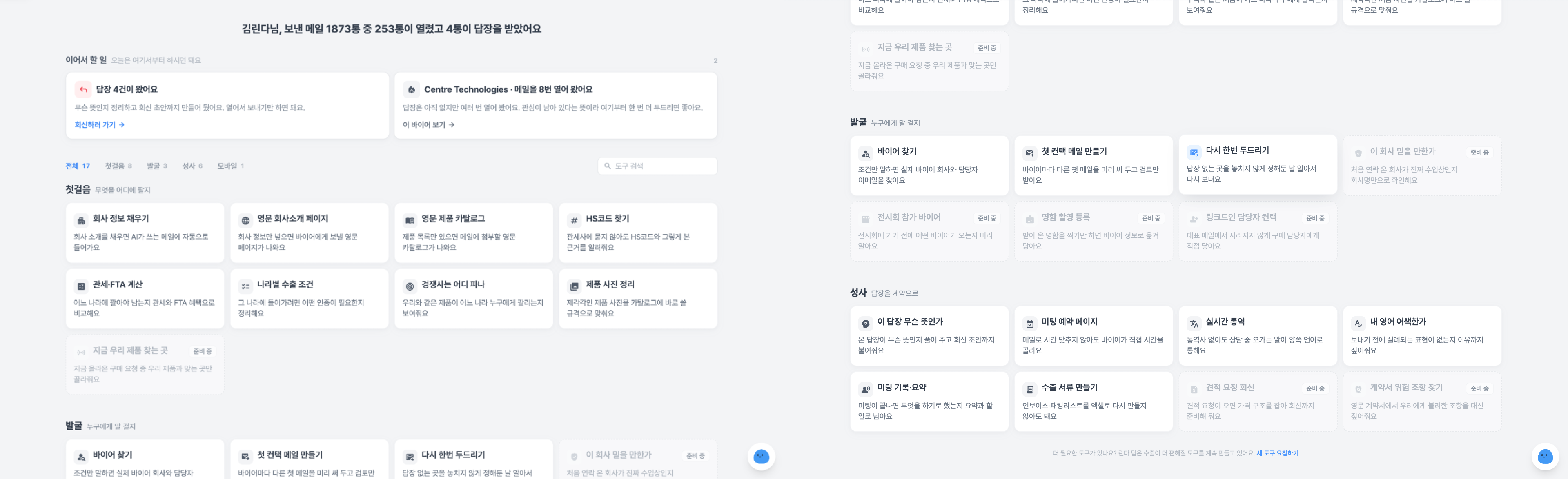
Documents, Customs, Certification — The "Must-Do" Tasks of Export Operations Have Become Tools
Create Export Documents — You no longer need to recreate invoices and packing lists in Excel separately. Enter the data once, and the same figures will automatically populate both documents. Select currency, units, and Incoterms from the lists, or enter them manually as "Other" if they aren't listed. Your payment account, country of origin, and signatory details are also included in the documents. We've reduced the input fields to the 33 most essential ones and refined them to ensure you don't miss fields that frequently cause customs clearance issues.
Find HS Codes — You don't need to ask a customs broker; we provide the correct HS code for your product along with the reasoning behind it.
Calculate Customs & FTA — Compare which countries are more profitable by analyzing customs duties and FTA benefits. Simply select the country on the world map.
Export Requirements by Country — We summarize the certifications required to enter each country.
The Map Answers Which Country to Target with Color
Where Competitors Are Selling — We show you where and to whom products like yours are being sold. The world map uses color-coding to distinguish between highly competitive markets and untapped ones, allowing you to choose which market to explore at a glance.
Standardize Product Photos for Buyers
Organize Product Photos — We standardize your varied product photos into a square format with a white background and consistent size. These specifications are ready for use in catalogs or brochures. You can now fix alignment issues caused by photos of different sizes and backgrounds all at once.
Major Overhaul of Export Brochures
We have restructured the brochure from the table of contents to the slides, following a brand presentation framework. We fixed the issue where product photos would disappear or the export process would fail when exporting to PDF, and the screen now updates in real-time to show you the progress while you create it.
You can edit the generated slides directly, and just like in a presentation editor, you can move and refine text and elements right on the slide.
A "English Product Catalog" card has been added to the [Export Tool Suite], allowing you to access it directly from the card without going through the brochure screen.
Fixed the Issue Where Emails Were Sent All at Once When Campaigns Were Activated
Previously, if you activated a campaign after its scheduled send time had already passed, all the queued emails would be sent out immediately.
Now, if the scheduled time has passed, it will move to the next sending date, and there is a 60-minute grace period immediately after activation.
Other Changes
You can receive a 50% discount on your first payment until September 14th. We have extended the event by one month.
The screen now tells you why an email wasn't sent. Instead of just showing "Not Sent," we have categorized the actual reasons into 6 types.
Campaign buyer selection has become more accurate. Buyers already in progress are excluded by default, and you can include them all at once if needed.
Bounce handling has been re-categorized. We resolved issues where we kept sending to addresses rejected by the recipient, as well as issues where valid addresses were discarded due to temporary errors.
Recovered missing results in Buyer Search. We fixed the issue where results were completely discarded due to differences in HS code notation, and the issue where the system would say "Not Found" simply because the search took too long.
Fixed the issue where France and the UK disappeared from the map.
Values are no longer lost when downloading and re-uploading buyer lists as CSV. Even if already registered buyers are mixed in, the system now fills in missing contact information without discarding those rows, and we fixed the issue where the preview would block uploads by saying "0 registered."
We now tell you the reason when email account connection hits a limit. Instead of just saying "Please try again," we guide you on which limit was reached and what to do next.
Refined the titles and sentences in the Weekly Performance Report. We changed it so it doesn't feel like a report card for a quiet week.
When you are curious about pricing, the chatbot now answers with the actual amount. Instead of just giving you a link, it provides the answer in your local currency.
Actual screen captures have been added to the User Guide so you can follow along while seeing exactly where to click. We have also prepared guides for each of the newly opened tools.
Clicking the readiness indicator on the sales information screen now takes you directly to the field that needs to be filled.
You are now guided in the language you used to sign up, and if entering your company name is blocked, the screen will tell you why.
Fixed the issue where the first step of creating a campaign would get stuck on "Initializing," and the issue where the list would close when selecting a group.
The top of the [Export Tool Suite] main screen has been organized into a single banner. You can now start from the same place regardless of your usage situation.
Corrected an issue where client addresses were incorrectly added to the buyer blocklist during the process of organizing unsubscribed addresses.
Fixed the screen that was requesting payment details while you were still in the trial period.
Revised the Privacy Policy. We specified the procedure for deletion requests related to Rinda Field data, which will be effective from August 20, 2026.
As the newly opened tools have just been released, there may be some awkward areas.
If you encounter any issues while using them, please let us know anytime via "Request New Tool" at the bottom of the [Export Tool Suite].
Thank you.
Sincerely, Rinda Team
Last updated August 13, 2026