New tools to help with exports — v2.9.4.0 update
Hello, this is the Rinda Team.
Finding buyers, writing emails, creating introductions... export operations involve switching between many screens.
As a result, the question "So, what should I do now?" always remained.
In this update, we have created a new screen that answers that question first.
[Export Toolkit] has been added to the sidebar
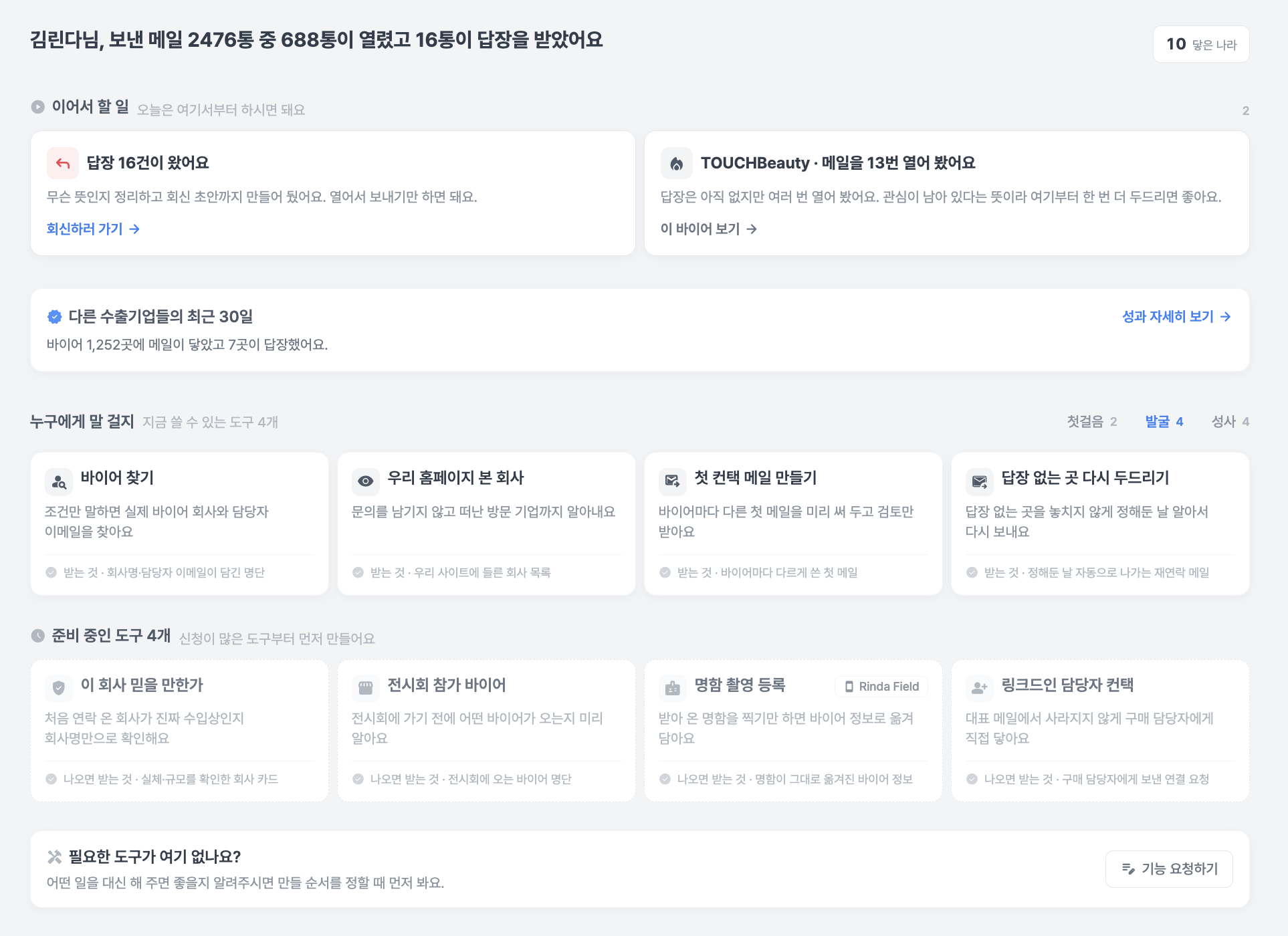
We have gathered 24 tools used for export operations in one place. It is located at the top of the sidebar, and we have marked it as Beta as we are still refining it.
The screen tells you what to do first. Whether you haven't sent a single email yet or are waiting for replies, a "Next Steps" card tailored to your current status will appear.
Don't miss buyer interest signals. We highlight cards for companies that haven't replied but have opened your emails multiple times, or places where you've sent everything but are now quiet.
You can preview what each tool creates. You can check what the output looks like before opening the card to make your selection.
For tools still in preparation, you can click "Notify me when ready," and we will let you know as soon as they are available.
When you search for "Japanese clothing buyers," you get Japanese clothing buyers
We have fundamentally fixed the issue where unrelated industries were mixed into search results in the buyer finder.
The search query is now divided into three axes: "Item / Country / Buyer Role" before searching.
Previously, if role words like "wholesale" or "distribution" were mixed in, the item condition would be lost entirely, leading to results like coffee roasters, animal hospitals, or travel agencies when searching for Japanese clothing buyers.
Now, the same search will find 427 actual clothing distributors.Searching again won't fill results with companies you've already saved.
Previously, even if more than half of the results were companies already on your list, it would finish normally as "Goal Reached."
Now, companies you already have cannot occupy goal slots, and it automatically avoids re-running essentially the same search.Which countries to view now varies by company.
Previously, we showed the same 27 countries to everyone, but now we select country candidates by reading both the company's sales information and actual export statistics.
Other changes
You can now create and publish export introductions and buyer catalogs yourself. Previously, we did this for you, but now you can do it directly in the [Export Toolkit]. We create everything from the table of contents to the slides, and you can also choose to receive them as PDFs without publishing. You can add the link to the published catalog to your email signature.
You can now duplicate campaigns and resend them. We fixed the issue where personalized body text, sending schedules, sending accounts, and multiple buyer groups disappeared during the duplication process.
If you get blocked when attaching files to emails, we tell you why. We have also standardized the attachment size limit to 20MB.
Weekly performance reports now arrive reliably. We changed the headline from "how many you sent" to Interested Replies, Meetings, and Waiting for Replies, and we will notify you if a reply to an interested response is delayed.
You can see the actual performance of other export companies. A summary appears in the [Export Toolkit], and you can click the card to check details by country and industry. These are not estimates we made, but numbers counted from actual buyer reactions.
The sign-up process has become easier. We fixed the issue where company analysis results only appeared in Korean, so they now appear in your chosen language. Instead of memorizing and entering country codes, you can select them from a list. If company name entry is blocked, the screen will tell you the reason.
We have cleaned up blocked points on the payment screen. We have improved annual payment guidance, recovery after payment failure, and post-payment actions, and we have also blocked Korean error messages from leaking to users overseas.
The issue of emails going to spam folders has been resolved by organizing sending domains, and if bounce rates increase, we automatically pause the sending account to protect it.
Korean translations are now displayed alongside received replies.
The email inbox and dashboard have become noticeably faster. Since these are screens you open every day, you will be able to feel the difference immediately.
We have added labels to 144 icon-only buttons so they can be used with screen readers, and we fixed the issue where the sidebar would sometimes get stuck in English.
As the Export Toolkit is a newly created screen, there may be some awkward areas.
If you encounter any issues while using it, please let us know at any time.
For your reference, you can now send feedback directly via the "Feature Request" card at the bottom of the [Export Toolkit].
Thank you.
Sincerely, Rinda Team
Last updated August 6, 2026