From market browsing to finding buyers, all in one flow — v2.9.1.0 Update
Hello, this is the Rinda Team.
We have been releasing many beta features recently.
These features have been receiving enthusiastic support from our users, more than we expected.
So, we decided to take this opportunity to improve the overall experience.
In fact, in the previous update, the screen for browsing overseas markets and the screen for finding buyers were separate, which created a disconnect where users would think, "I've spotted a market here, so where do I find the buyers?"
This update focuses on connecting that flow and smoothing out the transition to writing emails to the buyers you've found.
Market exploration and buyer search are now one
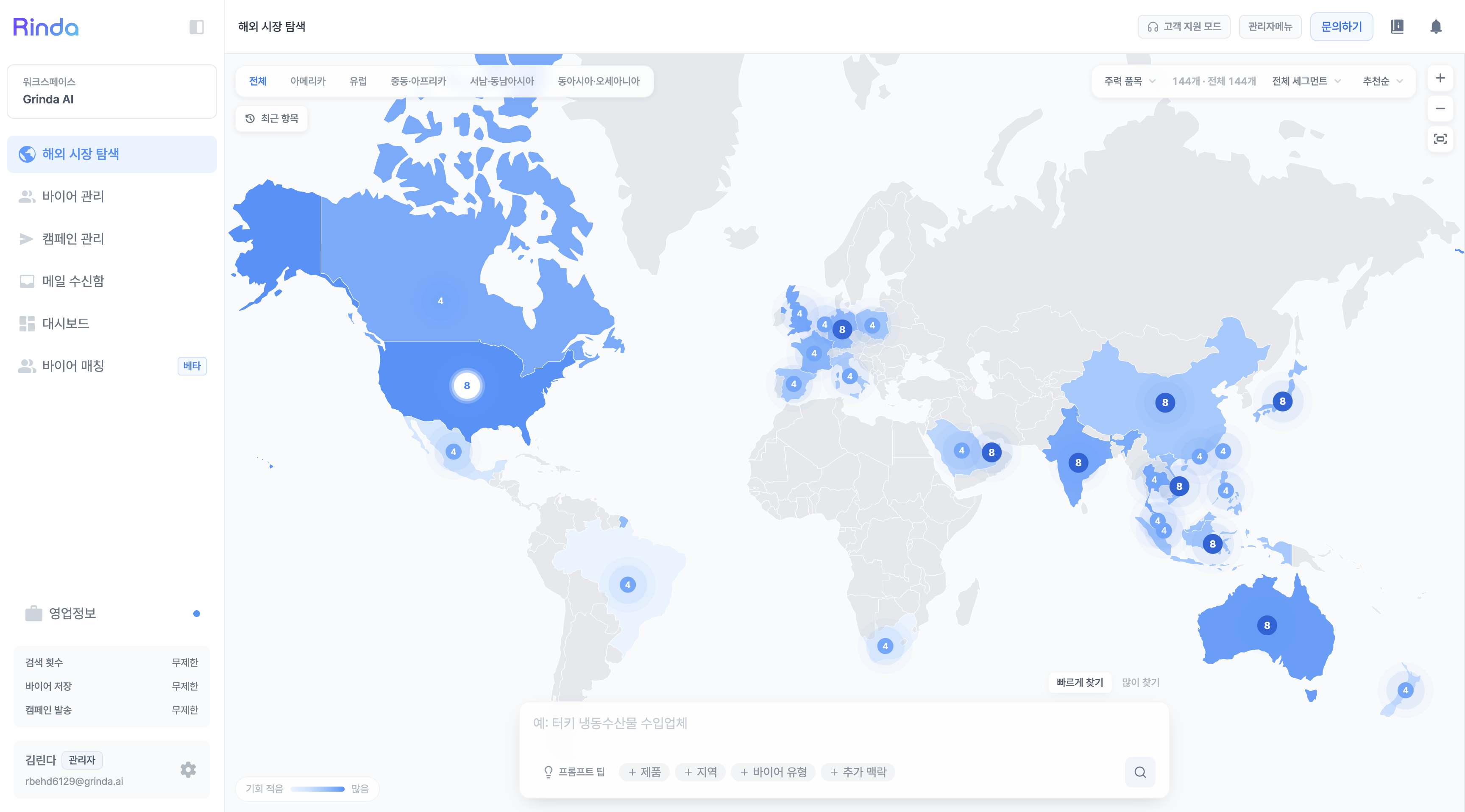
Now, overseas market exploration and buyer search have been merged into a single integrated funnel.
When you're browsing overseas markets of interest on the map and find a place you like, you can proceed directly to buyer search right there without needing to switch screens.
The entry flow has become much simpler, and once you finish saving a buyer group, you can immediately move on to [Write Sales Email].
The map itself has also become more convenient.
We've optimized it to move smoothly even on low-spec devices, and cards are now organized as floating elements on the map, making it easier to scan markets at a glance.
If you edit the sample email until you're satisfied, Rinda will handle the rest
You might have had moments while reviewing sample emails to send to buyers where you thought, "I want to change this sentence like this."
Now, if you edit the sample body directly, Rinda will read your preferences (what content to include, what to remove, and how to refine it) and apply those adjustments to each buyer individually.
It's like editing once and having dozens of emails aligned to your tone.
Other changes
For subscribers, a dedicated manager will be assigned. You can check your dedicated manager in the app settings screen and book a meeting with a single button for a 1:1 consultation.
A Forward function has been added to the email inbox — you can forward received emails to others and specify multiple recipients at once (in chip/tag format).
You can now follow multiple conversations with the same buyer at a glance by linking them in the thread details.
The campaign list has become noticeably faster (the screen flickering when opening has also disappeared).
We fixed the issue where campaign names were displayed in Korean regardless of the seller's language settings.
Clicking on image attachments in reply emails now opens them correctly, and the translation button for foreign language replies appears reliably.
We have cleaned up the spam filter labels (e.g., SPAM) that were appearing in the subject lines of received emails.
We will continue to refine Rinda so that the flow of "finding, reaching out, and closing deals" remains uninterrupted.
Please try it out, and if you have any inconveniences or further requests, feel free to leave them with your dedicated manager or through this channel at any time.
Your feedback becomes our next update.
Thank you.
Sincerely, Rinda Team
Last updated July 16, 2026